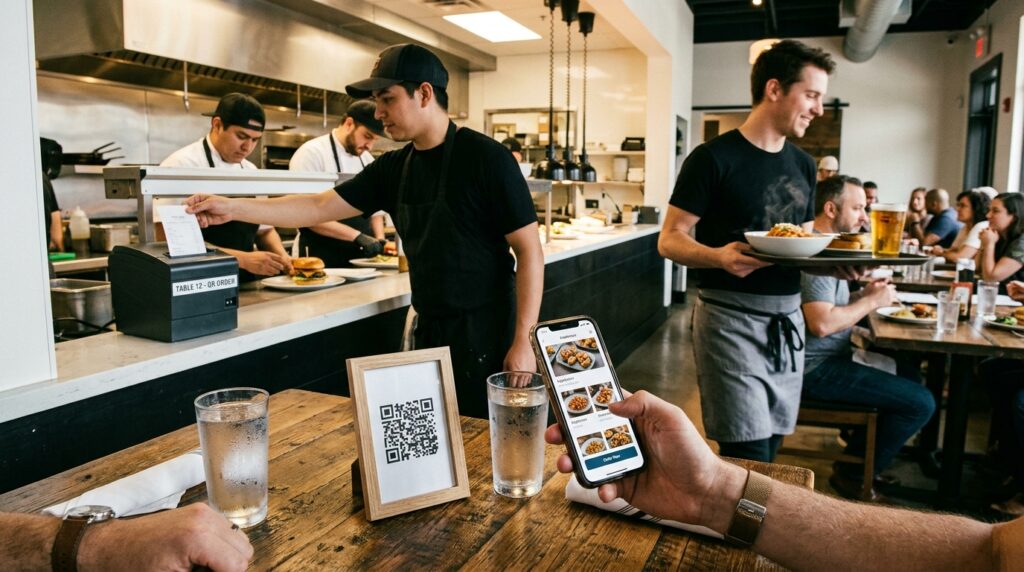
A server walks past three tables to take one order. Two of those tables have been waiting. The third is still deciding. None of this is anyone’s fault. It is just how table service works when the ordering process runs through a single point of contact.
A QR code on each table changes the dynamic. Guests scan when they are ready, not when a server happens to be free. Orders arrive in the kitchen without a verbal relay chain. Tables turn faster. Staff spend less time taking orders and more time delivering food and drinks.
This guide covers three levels of QR code restaurant ordering, how to set up each one, and what the realistic costs and tradeoffs look like.
Three Approaches to QR Code Restaurant Ordering
QR code ordering exists on a spectrum. The right level for your restaurant depends on your volume, your technical setup, and how much you want to invest upfront.
Level 1: QR code menu (no ordering)
A QR code that links to a digital menu. Guests scan, browse the menu, and still place their order with a server. No ordering functionality. No payment processing. Just a scannable menu.
This is the right starting point for restaurants that want to reduce printed menu costs and give guests a better browsing experience without changing the service model. It takes under 10 minutes to set up and costs nothing beyond the QR code itself.
For the full setup guide, see how to make a QR code for your restaurant menu.
Level 2: QR code order form (low cost, no POS integration)
A QR code that links to an ordering form where guests select items and submit their order. The order goes to a display or a printout at the kitchen or bar. No payment at the table. Payment on collection or at the end of the meal via a traditional process.
This level removes the server from the ordering step while keeping payment conventional. It works well for cafes, bars, and fast-casual restaurants where orders are simple and a till at the counter handles payment.
The setup uses a free form tool like Google Forms or a low-cost ordering form tool. No POS integration required. Cost: free to around £20 per month depending on the tool.
Level 3: Full QR code table ordering with payment
A QR code that opens a full ordering interface where guests browse the menu, add items to a basket, and pay from the table. Orders go directly to the kitchen display system. No server involvement in ordering or payment.
This is the approach used by major casual dining chains and fast-growing independents. It requires either a dedicated ordering platform or a POS system with built-in QR ordering. Cost: typically £50 to £200 per month depending on the platform and cover count.
Setting Up Level 2: Google Forms Table Ordering (Free)
The Google Forms approach is the fastest free path to functional table ordering. It is not as polished as a dedicated platform but it works, it costs nothing, and it can be live in under an hour.
Step 1: Build the order form in Google Forms
Open Google Forms and create a new form. Add these fields:
- Table number: a short text field or a dropdown with your table numbers. This tells the kitchen or bar which table the order is from.
- Starters: a checkbox grid listing every starter with their names. Guests tick what they want.
- Mains: same format.
- Sides and extras: same format.
- Drinks: same format.
- Dietary notes or special requests: a paragraph text field for anything not covered by the checkboxes.
Keep the form simple. A long form with too many options creates decision fatigue. If your menu is extensive, consider separating food and drink into two forms accessed from two QR codes at the table, or use a section-based form with navigation between pages.
Step 2: Set up order notification
In Google Forms, click the three-dot menu and select Get email notifications for new responses. Enter the email address monitored at the kitchen or service station. Every order submission sends an email notification. If you use a tablet or monitor at the pass, set the Google Sheets responses tab to auto-refresh and display it permanently. Orders appear in the sheet in real time.
For a busy service, email notifications alone are not fast enough. The Google Sheets live view is more practical. Open the linked spreadsheet on a screen at the pass, set the browser to refresh every 30 seconds, and new orders appear automatically.
Step 3: Create table-specific QR codes
For the pre-filled table number approach, create a separate QR code for each table. Each code points to the Google Form URL with the table number pre-filled as a query parameter. When a guest scans Table 7’s QR code, the form opens with Table 7 already filled in. They do not need to type it.
To get the pre-filled URL: open the form and click the three-dot menu. Select Get pre-filled link, enter the table number, click Get link, and copy the URL. That URL becomes the destination for that table’s QR code at toolshash.com.
Create one QR code per table. For a restaurant with 20 tables, this takes around 30 minutes. For larger setups, see the bulk generation method in bulk QR code generator: create hundreds of unique QR codes at once.
Step 4: Design and print the table QR codes
At toolshash.com, select Website / URL as the QR type for each table code. Set error correction to H (High) for table cards that will be handled daily. Customise the foreground color to match your restaurant’s brand. Download as SVG for print.
Print each code on a small tent card or a laminated insert card for a table stand. A 3cm x 3cm code on an A7 tent card scans reliably from a seated position at 30 to 40cm. Label each card with the table number in small text below the code so staff can identify them when restocking. For full table card print guidance, see how to make a QR code for your restaurant menu.
Create your restaurant QR codes free at toolshash.com
Setting Up Level 3: Dedicated QR Ordering Platforms
For restaurants that want a polished guest experience with basket management, modifiers, and integrated payment, a dedicated platform is the right investment. Here are the most practical options at the independent restaurant scale.
Flipdish
Flipdish offers QR code table ordering as part of its broader digital ordering suite. Guests scan, order, and pay from the table. Orders go directly to the kitchen display. Pricing is based on a monthly subscription plus a small commission per order. Strong UK and European support with good integration options for existing POS systems.
Sunday
Sunday specialises specifically in pay-at-table functionality. Guests scan, view the bill, split it, and pay from their phone. It integrates with most major POS systems including Square, Lightspeed, and Clover. The pay-at-table function reduces bill settlement time significantly, which improves table turns. Pricing is commission-based rather than a flat monthly fee.
Nutritics Ordering
A UK-based platform popular with restaurants that need allergen management alongside QR ordering. Particularly relevant for operators with complex menus or multiple dietary requirement categories. The allergen filtering in the ordering interface gives guests confidence about what they are ordering without requiring staff to recite the allergen information verbally.
Square for Restaurants
Square’s restaurant-specific POS plan includes QR code table ordering functionality. For restaurants already using Square as their POS, enabling QR ordering is relatively straightforward. The free plan covers the basics. The Plus plan at around £60 per month adds the full table ordering features.
What QR Code Ordering Changes for Your Operation
Before committing to any level of QR code ordering, it is worth being clear about what changes and what does not.
What changes: the ordering step is removed from server workflow. Orders arrive in the kitchen without a verbal relay. Upsell opportunities shift from server recommendation to digital prompt. Table turn time typically improves. Staff can focus on food delivery, drink top-ups, and guest experience rather than order taking.
What does not change: food quality, kitchen capacity, and hospitality. A QR code does not fix a slow kitchen or reduce the number of kitchen staff needed. It does not replace the server relationship that creates repeat customers at higher-end restaurants. For fast-casual and cafe environments, QR ordering is a natural fit. For fine dining where the service interaction is part of the value, a hybrid approach (QR for drinks, server for food) often works better than full QR ordering.
Frequently Asked Questions
Can I set up QR code ordering without a website or app?
Yes. The Google Forms approach in Level 2 requires no website, no app, and no technical setup beyond a Google account. The form is hosted by Google. The QR code links to the form. Orders arrive by email or in a Google Sheet. The entire system runs on free tools that most restaurant owners already have access to.
What happens if a guest submits an order for an item that is off the menu that day?
For the Google Forms approach, there is no automatic stock management. If an item runs out, remove it from the form or mark it as unavailable in a note. For dedicated platforms, most include the ability to toggle item availability in real time from a staff device. Sending a server to apologise for an out-of-stock item is still faster than taking the order conventionally. But updating the menu before service is better than managing it reactively.
Do guests need to download an app to use QR code ordering?
No. QR code ordering links open in the phone’s browser. No app download is required for any of the approaches described in this guide. The guest scans with their native camera app and the ordering interface opens in Safari, Chrome, or whichever browser is on their phone. This is a significant advantage over older ordering systems that required app installation.
How do I handle table service for guests who cannot or will not scan a QR code?
Keep the conventional service option available. QR code ordering should supplement table service, not replace it entirely for guests who prefer the conventional approach. Older guests or guests without smartphones will need a server. A hybrid approach where most tables order via QR and conventional service remains available for the rest is more practical than a QR-only policy that frustrates some guests every service.
Can I use QR code ordering for drinks only?
Yes, and this is a popular hybrid approach. A QR code for drinks only removes the most frequent server interruption. Food orders stay with a server who can make recommendations and handle complex requests. Set up a Google Form with drinks only. Use a clear prompt on the table card: “Scan to order drinks” rather than “Scan to order” sets the expectation correctly.
Does QR code ordering work for takeaway or collection orders?
Yes. A QR code at the counter, on a takeaway menu, or in the window links to an ordering form where customers select items and provide a name for the order. The kitchen sees the order in the Google Sheet, prepares it, and calls the name when ready. This works particularly well for counter-service cafes, delis, and small food businesses that want to reduce queue pressure during peak hours.
Read these next: