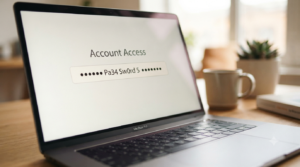
A password generator set to 12 characters produces a password strong enough for most everyday accounts. However, it is not the strongest option available to you. Twelve characters clears the minimum that security guidelines recommend. Even so, it leaves less room for error than a longer password does. Computing power used for guessing passwords keeps improving every year. This guide explains exactly where a password generator 12 characters long holds up. It also covers where that length falls short and how to decide what fits each account you own.
You will find a comparison against other common lengths and real scenarios where 12 characters is enough. There is also a short process for generating one correctly. By the end, you will know exactly when to reach for this length and when to go further.
Is a Password Generator 12 Characters Long Actually Strong Enough?
Twelve characters, when mixed with uppercase letters, lowercase letters, numbers, and symbols, creates a password with a large number of possible combinations. That range is what makes guessing difficult for both automated tools and human attackers. According to the NIST digital identity guidelines, length contributes more to password strength than complexity rules do. Eight characters is treated as a practical minimum rather than a target.
Twelve characters sits comfortably above that minimum, so it is a reasonable baseline for most personal accounts. However, “reasonable” is not the same as “strongest available.” Attackers with access to modern hardware can work through shorter passwords faster every year. This happens simply because computing power keeps increasing. A password generator set to 12 characters protects well today. Pushing to 16 characters or more, though, costs you nothing extra in a generator and buys meaningful room for the future. Setting a generator to the maximum length a site allows is almost always the safer default when you are unsure which length to pick.
12 Characters vs Other Common Lengths
Length is the single biggest factor in how long a password resists guessing. The table below compares common lengths in relative terms, without relying on specific crack time estimates that vary by hardware and method. Use it as a general guide rather than an exact measurement.
| Length | Relative Strength | Best Used For |
|---|---|---|
| 8 characters | Meets the bare minimum, weak by current standards | Low value accounts only, if ever |
| 12 characters | Solid baseline for everyday use | Most personal accounts and subscriptions |
| 16 characters | Strong, comfortable margin above the baseline | Email, banking, and other sensitive accounts |
| 20 or more characters | Very strong, often used as a passphrase instead | Master passwords and high value accounts |
Where 12 Characters Wins
Twelve characters strikes a practical balance. It is long enough to resist most guessing attempts, yet short enough to fit almost every site’s maximum length restriction without issue.
Where a Longer Password Wins
A password protecting your email, your bank, or your password manager’s master login benefits from extra length. Since a generator does the typing for you anyway, there is little reason not to go longer on your most sensitive accounts. The small extra effort at setup time pays for itself many times over.
When 12 Characters Is Enough, and When It Isn’t
A streaming subscription, a forum account, or a newsletter signup rarely needs more than a solid 12 character password. If that account were compromised, the damage stays limited and contained. Because the stakes are low, a password generator 12 characters in length offers more than enough protection for the effort involved. Spending extra time increasing the length here brings little real benefit.
Your email account tells a different story. Email often serves as the recovery method for every other account you own, so a breach there can cascade into several more. The same logic applies to banking, tax software, and any account tied to your identity or your money. For these, treat 12 characters as a floor rather than a target, and push toward 16 or beyond whenever the option exists. The extra length costs nothing when a generator is doing the work anyway, and the difference in typing time is barely noticeable once autofill handles it for you.
How to Generate a Strong 12-Character Password
Generating one correctly takes only a few steps, and skipping any of them weakens the result. Whether you use a password generator 12 characters long or a longer setting, the process stays the same from start to finish.
- Open a free password generator that lets you set an exact character count.
- Set the length to 12 and enable uppercase, lowercase, numbers, and symbols.
- Generate a fresh result rather than editing an old password into a new one.
- Check the target site’s password rules, since some forms reject certain symbols.
- Save the password in a password manager immediately, before you forget where it came from.
Skipping the last step is the most common mistake, since a strong password stored nowhere safe tends to get forgotten and reset within weeks. A password manager removes that risk entirely, since it remembers the password so you do not have to. Most people only learn this the hard way, after resetting the same account two or three times in a single year.
Common Mistakes People Make With 12-Character Passwords
A 12 character password only works as intended when it is truly random. The mistakes below quietly undo that strength, even though the password still technically meets the length requirement. Each one is easy to fall into without realizing it.
- Starting every password with a capital letter and ending with a number or symbol, since attackers expect this pattern by default.
- Reusing the same 12 character password across multiple accounts, which turns one breach into several.
- Building the password from a name, birthday, or common word instead of letting a generator choose it randomly.
- Assuming 12 characters is always enough, even for accounts that clearly deserve more protection.
- Writing the password down somewhere unprotected instead of storing it in a password manager.
None of these mistakes are hard to avoid once a generator is doing the actual work instead of your own memory or habits. The pattern behind most of them is the same: relying on a shortcut that feels convenient in the moment but quietly undermines the password’s strength.
Frequently Asked Questions
Is a 12 character password safe to use in 2026?
Yes, for most everyday accounts, as long as it includes a genuine mix of character types and was generated randomly. It is not the strongest option available, but it comfortably clears current security guidelines. Pairing it with a password manager closes most of the remaining gap.
Should every account use the same password length?
No, matching length to the account’s importance makes more sense. Save 16 characters or more for email, banking, and your password manager, since those accounts carry more risk if compromised. Lower stakes accounts can stay comfortably at 12 characters without issue.
Is 12 characters better than a passphrase?
Neither format is inherently better, since both depend on genuine randomness and sufficient length. A passphrase of four to six words often reaches similar or greater strength while staying easier to type from memory, which makes it a reasonable substitute rather than a downgrade.
Why do some sites reject a 12-character generated password?
Some sites cap the maximum length below 12 characters or block certain symbols entirely. When that happens, adjust the generator’s settings to match that site’s specific rules before generating a new result.
Does adding more symbols matter more than adding length?
Length matters more overall, according to current security guidance. A longer password with fewer symbol types still tends to outperform a shorter password packed with symbols, since the number of possible combinations grows faster with length than with character variety.
How often should I regenerate a 12-character password?
Only when there is a real reason, such as a suspected breach or a site notification, rather than on a fixed schedule. Frequent forced changes often push people toward weaker, more predictable patterns instead of stronger ones.
Choose the Right Length for Each Account
Twelve characters works well as a everyday baseline, but it should not be the only length you ever use. A password generator 12 characters long fits most signups and subscriptions without issue. Reserve it for lower stakes accounts, and move to 16 characters or more anywhere a breach would actually hurt. The right length depends entirely on what you stand to lose, not on habit. Making that judgment once, per account, takes less time than dealing with the aftermath of a weak password that failed when it mattered most. A few extra seconds spent choosing the right setting now can save hours of cleanup later.
Try this password generator now and adjust the length to match each account’s importance. For a closer look at passphrases as an alternative format, see The Passphrase Trick That Makes Passwords Easy to Recall. If you want help judging any free generator before you trust it, Why Some Free Password Generators Are Safer Than Others covers exactly what to check.