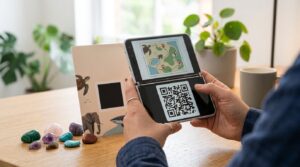
Animal Crossing QR codes let you import custom designs made by other players directly into your game. A QR code someone else created for a path pattern, a clothing design, or a custom flag gets scanned, and that exact design appears in your game ready to use. The system works differently between Animal Crossing New Leaf on the 3DS and Animal Crossing New Horizons on the Switch, and a lot of people get confused when codes from one game fail to work in the other.
Here is how the QR code system works in each game, how to scan codes, where to find good community-made designs, and how to create your own.
Animal Crossing New Leaf QR Codes
Animal Crossing New Leaf on the Nintendo 3DS has a dedicated QR code feature built into the Able Sisters shop. Once you unlock the Able Sisters shop in your village, you gain access to the QR code system through the fitting rooms at the back of the shop.
How to Scan QR Codes in Animal Crossing New Leaf
- Visit the Able Sisters shop in your New Leaf village
- Walk to the fitting rooms at the back of the shop
- Talk to Mabel, who stands near the fitting rooms
- Select the option to use the QR Code Machine
- Choose Scan a QR Code from the menu
- The 3DS camera activates — hold it up to the QR code image on your screen or phone
- The design encoded in the QR code imports into your design slots
New Leaf QR codes encode the full pixel data of a custom design pattern. Scanning one transfers the entire design data directly into the game, so you do not need to recreate any design by hand if someone else has already made it.
ACNL QR Codes for Paths
Custom path QR codes are among the most searched content in the Animal Crossing community. Paths transform the ground around your village with stone, grass, dirt, brick, or decorative tile designs that make the village feel far more polished and intentional than the default ground textures.
Path designs in New Leaf typically come as sets. A full path set covers multiple directional tiles: straight sections, corners, T-intersections, and dead ends that connect seamlessly when placed correctly. Most path QR code sets from the community include all the tile variations you need to build a complete path system.
When using path designs from QR codes, each tile takes one design slot. New Leaf provides a limited number of custom design slots, so importing a full path set with many tile variations can fill your available slots quickly. Plan which designs to prioritise before scanning a large set.
ACNL QR Codes for Clothes and Dresses
Clothing designs are the other major category of Animal Crossing QR codes. Any custom design in New Leaf can function as clothing when worn as a shirt or dress. The community has created thousands of QR codes for recreations of real-world clothing brands, anime character outfits, fandom costumes, and original designs.
Specific searches like “animal crossing qr code Callie dress” and “MLP Fluttershy QR code” reflect just how specific and dedicated the design-sharing community is. Fan communities for various properties often maintain dedicated pages of QR codes for character-accurate outfits.
Where to Find ACNL QR Codes
Several community resources specialise in Animal Crossing QR code sharing:
- r/ACQR on Reddit: A subreddit dedicated entirely to Animal Crossing QR code sharing, with search and flair filters for paths, clothing, flags, and other design types
- ACPatterns.com: A community site specifically for Animal Crossing design sharing that stores designs as QR codes with preview images and search functionality
- Pinterest: Large boards of ACNL QR codes exist for nearly every design category, particularly clothing and themed path sets
- Tumblr and personal blogs: Many dedicated Animal Crossing players maintain design blogs with curated QR code collections for specific themes or aesthetics
How to Create Your Own ACNL QR Codes
Creating a QR code from your own Animal Crossing New Leaf design works from within the game. The same QR Code Machine in the Able Sisters shop that lets you scan also lets you generate a QR code from any design already in your slots.
- Visit the Able Sisters shop and go to the QR Code Machine
- Select Display a QR Code instead of scanning one
- Choose the design you want to share from your slots
- The game displays a QR code for that design on screen
- Photograph the QR code with your phone to save it for sharing
This built-in generation system means you do not need an external QR code tool to create Animal Crossing design codes. The game handles the encoding and decoding entirely within its own system. External QR code generators produce standard URL or text codes that the game does not recognise as design data.
Animal Crossing New Horizons QR Codes
Animal Crossing New Horizons on the Nintendo Switch uses a different system from New Leaf for importing custom designs. The primary method for sharing designs in New Horizons is through the Nintendo Switch Online app on your phone rather than a direct QR code scan within the game.
How Custom Designs Work in New Horizons
New Horizons has a Custom Designs Portal accessible through the Nintendo Switch Online companion app. Players upload designs to the portal with a unique creator code and design code. Other players enter those codes in-game at the Custom Design kiosk in the Able Sisters shop to download designs directly.
This system does not use the QR code scanning mechanic that New Leaf used. New Horizons does not have a QR Code Machine in the Able Sisters shop. If someone sends you an ACNL-style QR code and tells you it works in New Horizons, it does not. The two games use completely separate design sharing systems.
ACNH QR Codes: What Actually Works
Some QR code tools and community sites have created QR codes that encode a New Horizons design code or creator code as a URL or text string. Scanning one of these with your phone opens a page showing the design preview and the code string to enter in-game. The QR code in this case is just a convenient way to share the code string without typing it, not a direct design import mechanism.
If you see someone referring to “ACNH QR codes,” they most likely mean either this URL-based code sharing shortcut, or they are using the terminology loosely to describe the Custom Designs Portal code system. True in-game QR scanning as it existed in New Leaf does not exist in New Horizons.
Animal Crossing QR Code Maker Tools
Several fan-made tools exist specifically for creating and converting Animal Crossing designs:
ACPatterns.com: Lets you create designs online with a pixel editor, then generates an ACNL-compatible QR code for the finished design. Useful for creating designs without a 3DS if you want to preview and share before importing.
Animal Crossing Pattern Tool: A browser-based tool that converts images into Animal Crossing-compatible pixel art designs and outputs them as QR codes ready to scan in New Leaf.
Nook.lol / NHSE tools: Community tools for New Horizons that work with save data and the Custom Designs Portal rather than QR codes directly.
For creating QR codes that link to your Animal Crossing content online, like a portfolio of your designs, a village tour video, or a community page, the QR code generator handles any web URL with full design customisation. This is separate from the in-game QR system, which is specific to Animal Crossing’s own encoding format.
Common Problems with Animal Crossing QR Codes
Most problems people run into with ACNL QR codes fall into a few categories.
Scanning in the wrong location: The QR Code Machine is in the Able Sisters shop fitting rooms, and Able Sisters must be unlocked first. In the early days of a new village, the shop is not available. If you cannot find the QR Code Machine, check whether Able Sisters has fully upgraded in your village.
Using New Horizons codes in New Leaf: The two games use different design formats. A New Horizons creator code or design code string does not work with the New Leaf QR Code Machine.
Low-resolution QR code images: Community-shared ACNL QR codes sometimes get compressed when posted to social media. A compressed image loses the sharp module edges the 3DS camera needs to read the code. If a code from a website fails to scan, look for the original full-resolution version rather than a screenshot or thumbnail.
Full design slots: New Leaf has a limited number of custom design slots. If all slots are full, the game cannot import a new design. Free up slots before scanning by deleting designs you no longer need.
Frequently Asked Questions
How do I scan QR codes in Animal Crossing New Leaf?
Go to the Able Sisters shop in your village and find the QR Code Machine in the fitting rooms at the back. Talk to Mabel and select QR Code Machine, then choose Scan a QR Code. The 3DS camera activates and you hold it up to the QR code image to import the design.
Do Animal Crossing QR codes work in New Horizons?
Not directly. New Horizons uses a Custom Designs Portal through the Nintendo Switch Online app rather than a QR Code Machine. Some community tools create QR codes that encode a New Horizons design code as a URL, which you can scan with your phone to see the code string and enter it manually in-game, but there is no direct in-game QR scanning in New Horizons.
Where can I find ACNL QR codes for paths?
The r/ACQR subreddit has a large collection of community-made path QR codes with search filters. ACPatterns.com maintains a searchable database of designs including full path tile sets. Pinterest has extensive collections of path designs organised by style and theme.
How do I create my own Animal Crossing QR code?
In Animal Crossing New Leaf, visit the QR Code Machine in Able Sisters and select Display a QR Code. Choose the design from your slots and photograph the displayed code with your phone to share it. For New Horizons, upload designs through the Custom Designs Portal in the Nintendo Switch Online app to get a shareable design code.
Why is my ACNL QR code not scanning?
The most common causes are: Able Sisters not yet unlocked in your village, the QR code image being too low resolution or compressed, design slots being full with no room to import, or trying to scan a New Horizons code with the New Leaf system. Check each of these before assuming the code itself is broken.
What is the best Animal Crossing QR code maker?
ACPatterns.com is the most widely used community tool for creating and sharing New Leaf QR codes online. It has a built-in pixel editor and generates compliant QR codes for New Leaf designs. For converting real images or photographs into Animal Crossing-compatible designs, the Animal Crossing Pattern Tool handles the image conversion and outputs a scannable QR code.
Design Your Village Your Way
The Animal Crossing QR code community has been creating and sharing designs for years, and the archive of available paths, clothing, and custom patterns is enormous. Whether you want a Japanese stone garden path, a specific fandom outfit, or a custom flag for your island, someone in the community has probably already made it.
For sharing your own Animal Crossing content online, including links to your design gallery, YouTube village tours, or community pages, the QR code generator creates scannable codes for any web link with full design customisation. And for understanding how the QR code format actually stores and encodes data at a technical level, the how QR codes work guide covers the mechanics clearly.