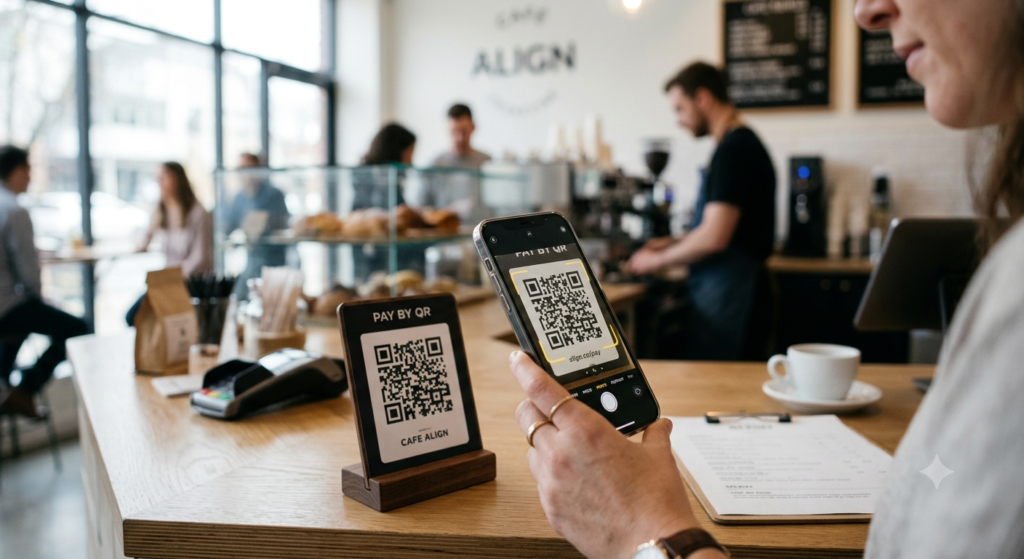
You have probably paid with a QR code without thinking much about it. You held your phone up at a checkout, someone scanned a code on your screen, and the payment went through. Or the reverse — a vendor showed you their code, you scanned it, and money moved. It is fast, contactless, and works without card terminals or cash. But how exactly does it work, and how do you set it up on your end?
This guide covers how QR code payments work, how to pay with a QR code across every major platform, and how to accept payments as a business or individual.
How Do QR Code Payments Work?
A payment QR code encodes the recipient’s payment details — usually an account identifier, a payment link, or a transaction request — into the pattern. When a payer scans the code with their payment app or phone camera, the app reads those details and pre-fills a payment form. The payer confirms the amount and the transaction processes through the platform’s payment network.
Depending on the platform, the QR code can encode a fixed amount with a pre-filled recipient, a recipient identifier where the payer enters the amount, or a dynamic transaction request generated fresh for each payment. The first two are static and work repeatedly. The third generates a new code per transaction, which suits retail point-of-sale environments.
How to Pay with a QR Code
Paying with a QR code follows the same basic steps across most platforms. Open your payment app, find the scan or pay option, point the camera at the merchant’s QR code, confirm the amount, and authorise the payment. The specific steps vary slightly by platform.
How to Pay with a QR Code on PayPal
Open the PayPal app, tap the QR code icon on the home screen or the Pay section, and select Scan. Point the camera at the merchant’s PayPal QR code. PayPal identifies the recipient and displays their name. Enter the amount, add a note if needed, and tap Pay to complete the transaction.
PayPal QR code payments between personal accounts carry no fee for the sender. Some business transactions attract PayPal’s standard processing fee depending on the account type and transaction category.
How to Pay with a QR Code on Venmo
Open Venmo, tap the scan icon at the top of the screen, and point the camera at the Venmo QR code. Venmo loads the recipient’s profile automatically. Enter the amount, add a note, and choose Pay to complete the transaction. Venmo QR codes work the same way for both personal payments and business transactions.
How to Pay with a QR Code on Zelle
Zelle QR codes work through your bank’s mobile app if the bank has integrated Zelle with QR functionality. Open your banking app, navigate to the Zelle section, and look for the scan or QR option. Scan the recipient’s Zelle QR code and confirm the payment details before sending. Not all banks display Zelle QR codes in the same location within their app, so the exact path varies by institution.
How to Pay with a QR Code on Cash App
Open Cash App and tap the $ icon at the bottom of the screen. Tap the scan icon in the top right corner, point the camera at the recipient’s Cash App QR code, and confirm the payment details. Alternatively, the recipient can scan your personal Cash App QR code to request money from you directly.
How to Pay with Apple Pay via QR Code
Apple Pay uses NFC as its primary contactless payment method, but QR code support exists in specific contexts. Some retailers display QR codes that link to Apple Pay-compatible payment pages. Open the camera, scan the QR code, and if the destination supports Apple Pay, the payment sheet appears for Face ID or Touch ID confirmation. Apple Pay’s native QR integration depends on the merchant’s payment setup rather than the Wallet app itself.
How to Get a QR Code for Payments: Accepting Money
Setting up a payment QR code to receive money depends on which platform you use. Each major platform generates a personal or business QR code from within the app.
PayPal QR Code for Receiving Payments
Open the PayPal app, tap the QR code icon on the home screen, and select Your QR code. PayPal displays a scannable code linked to your account. Customers or friends who scan it can send you money directly. You can download or share the code image, print it, or display it on a screen. For businesses, PayPal also offers a printable QR code through the PayPal Business account dashboard.
Venmo QR Code for Receiving Payments
Open Venmo and tap the scan icon at the top of the screen. Switch to the My Code tab to display your personal Venmo QR code. Anyone who scans it can send you a payment or charge request. You can share or save the code image from this screen for printing or digital display.
Zelle QR Code for Receiving Payments
Zelle QR code availability for receiving payments depends on your bank. Many US banks that offer Zelle within their mobile app provide a personal QR code in the Zelle section. Check your bank’s Zelle screen for a QR code or profile sharing option. If your bank does not surface one, Zelle payment requests still work through the standard email or phone number method.
Cash App QR Code for Receiving Payments
Open Cash App, tap your profile icon or the $ amount at the top of the home screen, and tap QR Code. Cash App displays your personal QR code. Others can scan it to send money to your account. The code links directly to your Cash App identifier, so payments arrive in your balance immediately.
QR Code Payments for Business
For businesses, QR code payment systems offer a low-cost alternative to traditional card terminals. A printed QR code at a counter, on an invoice, or on a receipt removes the need for physical payment hardware while still accepting digital payments from customers.
Several platforms support business-focused QR payment setups.
- Square: Generates a QR code from your Square dashboard that customers scan to pay through Square’s checkout flow, supporting card payments and digital wallets
- Stripe: Supports QR code payment links through Stripe Checkout, where a generated QR code sends customers to a hosted payment page
- Shopify: Point-of-sale QR codes integrate with the Shopify POS system for in-person checkout without a card reader
- PayPal Business: Offers a printable business QR code that accepts PayPal and Venmo payments directly
For businesses that invoice clients, adding a QR code to an invoice that links directly to a payment page reduces friction and speeds up collection. A customer who can pay by scanning rather than typing in card details is more likely to pay immediately.
To create a custom branded QR code for your payment link that matches your business identity, the QR code generator lets you add your logo, choose brand colours, and download in print-ready format for receipts, signage, or invoices.
Static vs Dynamic Payment QR Codes
Payment QR codes fall into two categories, and the distinction matters for how you use them.
A static payment QR code encodes a fixed recipient identifier. It works repeatedly and suits situations where the payer enters the amount themselves — a tip jar, a donation box, or a personal payment code. Because it encodes the same data every time, you can print it once and use it indefinitely.
A dynamic payment QR code generates a fresh code for each transaction with a specific amount pre-filled. Retail point-of-sale systems use this approach so each transaction is unique and trackable. The code typically expires after a short time or once the payment completes. For a deeper look at how static and dynamic QR codes differ beyond payments, the static vs dynamic QR code guide explains the full picture.
Are QR Code Payments Safe?
QR code payments carry the same security profile as the underlying payment platform. PayPal, Venmo, Zelle, and Cash App all use encrypted connections and authentication requirements to protect transactions. Scanning a legitimate payment QR code is no riskier than tapping a payment link on a trusted website.
The risk area is fake payment QR codes. A fraudulent code in a public setting can redirect scanners to a phishing page that mimics a legitimate payment platform. Before completing any payment, check that the recipient name matches who you expect to pay, verify the platform URL appears correct in your browser, and never enter payment credentials on a page that looks unusual or unfamiliar.
Always use the payment platform’s own app to scan payment codes rather than a generic camera app where possible, since payment apps validate the destination before displaying the payment screen.
Frequently Asked Questions
What is a QR code payment?
A QR code payment uses a scannable code to transfer payment details between a payer and a recipient. The code encodes account information or a payment request. When scanned with a compatible app, it pre-fills the payment form so the payer confirms and authorises the transaction without typing account details manually.
How do I pay with a QR code?
Open your payment app, find the scan or pay option, and point the camera at the recipient’s QR code. The app loads the recipient’s details automatically. Enter the amount if it is not pre-filled, confirm the details, and authorise the payment. The exact steps vary slightly by platform but follow this same sequence.
How do I get a QR code to receive payments?
Open your payment app and look for a QR code or profile sharing option. PayPal, Venmo, and Cash App all generate a personal QR code from within the app that others can scan to send you money. For business use, platforms like Square, Stripe, and Shopify generate payment QR codes through their merchant dashboards.
How do I create a QR code for PayPal?
Open the PayPal app, tap the QR code icon on the home screen, and select Your QR code. PayPal displays and lets you download a scannable code linked to your account. For a business version with branding, log into your PayPal Business account online and access the QR code tools from the payment acceptance section.
Can I accept payments with a QR code without a card terminal?
Yes. A printed or displayed QR code linked to a payment platform lets customers pay digitally without any card terminal hardware. PayPal, Venmo, Cash App, and Square all support this approach. For small businesses and sole traders, a printed payment QR code is a low-cost way to accept contactless payments in person.
Are QR code payments free?
Personal QR code payments between individuals are free on most platforms including PayPal, Venmo, and Zelle when funded from a bank account or balance. Business transactions typically attract a processing fee that varies by platform and transaction type. Check your platform’s fee schedule for the specific rates that apply to your account type.
How do I make a QR code for Venmo?
Open Venmo, tap the scan icon at the top of the screen, and switch to the My Code tab. Your Venmo QR code appears and you can save or share the image from that screen. Anyone who scans it can send you a payment directly through Venmo.
The Practical Side of QR Payments
QR code payments work well when both sides know what to expect. For personal use, the built-in QR codes in PayPal, Venmo, Zelle, and Cash App handle everyday transactions cleanly. For business use, the combination of a printed branded QR code and a reliable payment platform removes the hardware cost while keeping the checkout experience smooth.
To create a branded payment QR code for your business with your logo and colours built in, the QR code generator gives you full design control with print-ready download options. And if you plan to use dynamic codes that track payments and can be updated, the dynamic QR code guide explains exactly how the redirect system works and what to look for in a platform.