Pick up any product, walk into any restaurant, or open a marketing email and you will probably spot a QR code within seconds. But here is something most people never think about: not every QR code works the same way. Some can be updated after you print them. Some track every single scan. Some are small enough to fit on a component the size of your fingernail.
Choosing the wrong type does not just limit what your code can do. In some cases,
Pick up any product, walk into any restaurant, or open a marketing email and you will probably spot a QR code within seconds. But here is something most people never think about: not every QR code works the same way. Some update after printing. Some track every scan. Some are small enough to fit on a component the size of your fingernail.
Choosing the wrong type does not just limit what your code can do. In some cases, it means starting over entirely. So before you generate anything, here is what you actually need to know.
The Most Important Distinction: Static vs Dynamic
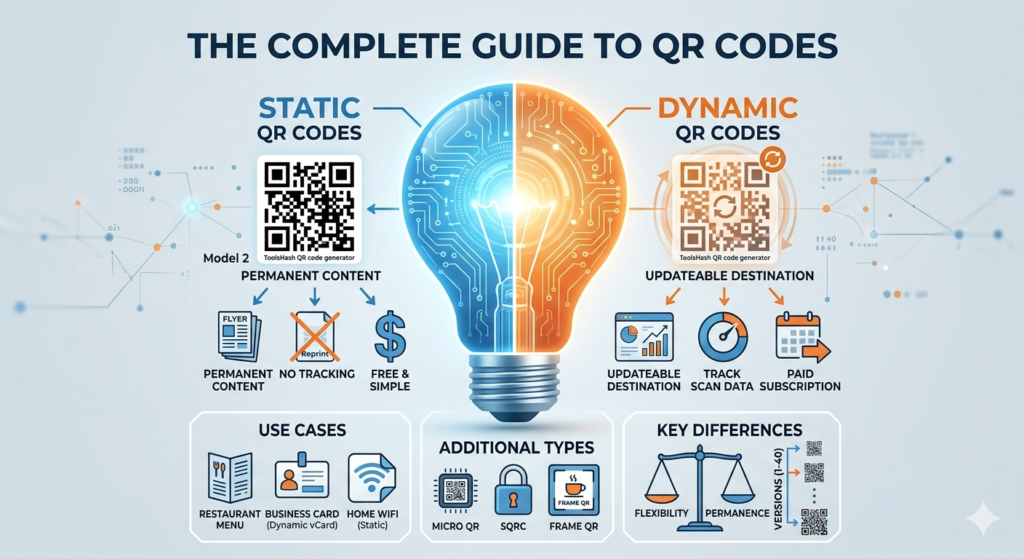
Every QR code you create falls into one of two categories. Understanding this split matters more than anything else in this guide, because it affects cost, flexibility, and how long your code stays useful.
Static QR Codes
A static QR code encodes its destination directly into the pattern. Once you generate it, that content stays locked in permanently. If the URL changes later, or the phone number becomes outdated, the code stops working and you need to create a new one from scratch.
That said, static codes come with real advantages. They cost nothing to generate, require no account or subscription, and work indefinitely without any server infrastructure behind them. For personal use or permanent content, they are perfectly reliable. A home WiFi QR code, a link to a fixed document, or contact details that never change are all good fits.
For business use, however, static codes start showing their limits quickly. When content changes after printing, the cost of reprinting can far outweigh what a dynamic solution would have cost from the start.
To create a free static QR code with full design options including colour, logo, and high-resolution download, try the QR code generator and have one ready in under a minute.
Dynamic QR Codes
A dynamic QR code works through a redirect. Instead of encoding the final destination directly, the pattern points to a short URL on a server, and that server sends the scanner to wherever you want. Because the redirect lives online, you can change the final destination at any time without touching the printed code.
For businesses, this changes things entirely. A restaurant can update their menu URL without reprinting table cards. A marketer can swap out a campaign landing page mid-run. An event organiser can redirect attendees to updated information after the flyers are already distributed. On top of that, every scan gets logged. You get a full picture: how many people scanned, when they did it, what device they used, and roughly where they scanned from.
In contrast to static codes, dynamic codes require a platform to manage the redirects, and most platforms charge a monthly fee. Free dynamic QR code generators exist, but many impose scan limits, forced branding, or expiry dates. For serious business use, a paid plan is the more reliable option.
For a full side-by-side breakdown of costs, expiry rules, and real use cases, the static vs dynamic QR code guide covers everything you need before making a decision.
When Does a Dynamic QR Code Make Sense?
Because this question comes up so often, it is worth answering directly. A dynamic QR code makes sense whenever any of the following apply:
- The destination URL might change after you print
- You need to track how many people scan and when
- You are running a marketing campaign and want performance data
- You want to test different landing pages using the same printed code
- You manage multiple codes across campaigns, locations, or products
Restaurants, retailers, real estate agents, event organisers, and marketing teams use dynamic codes most heavily. Essentially, anyone placing QR codes on printed materials that are expensive or impractical to reprint benefits from going dynamic from the start.
Other QR Code Format Types Worth Knowing
Static and dynamic describe how a QR code behaves. The formats below describe how it is physically structured. Most people will never need these, but they matter in specific industries and environments.
Model 1 and Model 2
Denso Wave created Model 1 as the original QR code format in 1994. Model 2 followed shortly after with better data capacity, stronger error correction, and broader character support. Today, every standard QR code you encounter is a Model 2 code. Model 1 is obsolete and effectively gone from practical use.
Micro QR Code
Micro QR codes are a compact version of the standard format. Because they use a single position detection pattern instead of three, the code fits into roughly a quarter of the space a standard one needs. As a result, they appear almost exclusively in industrial and manufacturing settings, such as circuit boards, electronic components, and small mechanical parts.
Consumer-facing use is rare because not all smartphone cameras handle Micro QR codes reliably. If everyday people need to scan your code, the standard Model 2 format is the safer choice.
SQRC
SQRC adds a private data layer to a standard QR code. It carries a public section that anyone can read and a private section that only a compatible scanner with the correct decryption key can access. Because of this, it works well for confidential supply chain data, internal asset tracking, or situations where sensitive information needs to sit alongside public-facing content.
SQRC is an enterprise-level format. Standard online generators do not produce it, and implementation requires purpose-built hardware and software.
Frame QR Code
A Frame QR code includes a customisable canvas area in the centre where you can place images, illustrations, or text without affecting scannability. This goes further than adding a small logo to a standard code. Inside the canvas area you can place a product photo, a detailed brand graphic, or a call-to-action message while the surrounding pattern stays fully functional.
Frame QR codes suit packaging design and visual marketing campaigns where brand presentation carries as much weight as functionality.
QR Code Versions: What the Numbers Mean
Standard QR codes come in 40 versions, numbered 1 through 40. Each version refers to the code’s size measured in modules, which are the individual black and white squares that form the pattern. Version 1 measures 21 by 21 modules, and each version up adds four modules per side, so Version 40 reaches 177 by 177 modules.
More modules means more data capacity. For example, a Version 1 code handles up to 41 numeric characters, while a Version 40 code stores up to 7,089 numeric characters or 4,296 alphanumeric characters. In practice, your generator picks the smallest version that fits the data you enter automatically, so you never choose it yourself. Shorter URLs produce simpler, cleaner codes, which is one reason keeping destination links short is worth doing.
QR Code Content Types: What Can You Actually Encode?
Beyond format and behaviour, QR codes also vary by the type of content stored inside. All of the options below use standard Model 2 structure. The difference is purely in the data format encoded within the pattern.
| Content type | What happens when scanned | Common use |
|---|---|---|
| URL | Opens a website or landing page | Marketing, menus, campaigns |
| WiFi | Connects device to network automatically | Cafes, hotels, offices |
| vCard | Saves contact details to phone | Business cards, networking |
| Plain text | Displays a message on screen | Instructions, notices |
| Opens a pre-filled compose window | Feedback, contact forms | |
| SMS | Opens a pre-filled text message | Opt-ins, alerts |
| App Store link | Takes user to app download page | App promotion |
| PDF or file | Opens or downloads a document | Brochures, manuals |
Each content type works as either a static or dynamic code. The ToolsHash QR code generator supports all of these content types and lets you customise the design and download format before saving.
Which QR Code Type Works Best for Business?
For business use, dynamic QR codes are almost always the stronger choice. The ability to update the destination without reprinting alone justifies the cost for most businesses. Add scan tracking and campaign analytics on top, and static codes simply cannot compete in a professional context.
Static codes suit businesses only in narrow situations: where content will never change and tracking adds no value. A permanent link to a company registration document or a fixed product manual are realistic examples. For everything else including menus, campaigns, business cards, signage, and packaging, dynamic is the practical choice.
Frequently Asked Questions
What are the different types of QR codes?
The main distinction is static versus dynamic, which describes how the code behaves. Beyond that, format types include standard Model 2, Micro QR, SQRC, and Frame QR. QR codes also vary by content type such as URL, WiFi, vCard, plain text, and email. For most everyday use, the choice comes down to static or dynamic.
What is the difference between a static and dynamic QR code?
A static QR code locks its destination permanently into the pattern. You cannot edit it after creation. A dynamic QR code routes through a short redirect URL, so you can update the final destination at any time without changing the printed code. Dynamic codes also record scan data including time, device, and location.
Can I change a QR code after printing it?
Only if it is a dynamic QR code. Because dynamic codes route through a redirect you control, you can update the destination without touching the physical code at all. Static QR codes are permanent. If the destination changes, you need to generate and reprint a new one.
What is a Micro QR code used for?
Micro QR codes serve industrial and manufacturing environments where space is extremely tight. Circuit boards, electronic components, and small mechanical parts are typical applications. Because standard smartphone cameras handle them inconsistently, Micro QR codes are not a good fit for consumer-facing use.
Are free dynamic QR codes reliable?
Some are, but many free dynamic tools impose scan limits, add forced branding to the redirect, or expire the code after a set period. For personal or low-volume use they can work fine. For business use where reliability and continuity matter, a paid platform is the safer option.
How many versions of QR codes exist?
There are 40 versions of the standard QR code format. Higher versions are physically larger and hold more data. Your generator picks the version automatically based on what you enter, so you never choose it yourself.
Which QR code type works best for a business card?
A dynamic vCard QR code is the best choice for business cards. It encodes your contact details in a format that saves directly to a phone when scanned. Because it is dynamic, you can also update your details if anything changes without reprinting the cards.
Wrapping Up
For most people, the decision is straightforward. Static codes are free, permanent, and simple. Dynamic codes cost a little more but give you the flexibility to update content and the data to understand how your audience engages with your printed materials.
When you are ready to build one, the ToolsHash QR code generator handles both types with full customisation options. And if you want to understand how QR codes store and protect data at a basic level, start with what a QR code actually is before going deeper into types and formats.
it means starting over entirely. So before you generate anything, here is what you actually need to know.
The Most Important Distinction: Static vs Dynamic
Every QR code you create falls into one of two categories. Understanding this split is more useful than anything else in this guide, because it affects cost, flexibility, and how long your code stays useful.
Static QR Codes
A static QR code encodes its destination directly into the pattern. Once you generate it, the content is locked. If the URL changes later, or the phone number becomes outdated, the code stops working and you need to create a new one from scratch.
That said, static codes come with real advantages. They cost nothing to generate, require no account or subscription, and work indefinitely without any server infrastructure behind them. For personal use or permanent content, they are perfectly reliable. A home WiFi QR code, a link to a fixed document, or contact details that never change are all good fits.
For business use, however, static codes start showing their limits quickly. And when content changes after printing, the cost of reprinting can far outweigh what a dynamic solution would have cost upfront.
To create a free static QR code with full design options including colour, logo, and high-resolution download, try the ToolsHash QR code generator and have one ready in under a minute.
Dynamic QR Codes
A dynamic QR code works through a redirect. Instead of encoding the final destination directly, the pattern points to a short URL on a server. That server then redirects the scanner to wherever you want. Because the redirect lives online, you can change the final destination at any time without touching the printed code.
For businesses, this changes the game entirely. A restaurant can update their menu URL without reprinting table cards. A marketer can swap out a campaign landing page mid-run. An event organiser can redirect attendees to updated information after the flyers are already distributed. On top of that, every scan gets logged. You see how many people scanned, when they did it, what device they used, and roughly where they were located.
In contrast to static codes, dynamic codes do require a platform to manage the redirects, and most platforms charge a monthly fee. Free dynamic QR code generators exist, but many come with scan limits, forced branding, or expiry dates. For serious business use, a paid plan is the more reliable option.
For a full side-by-side breakdown of costs, expiry rules, and real use cases, the static vs dynamic QR code guide covers everything you need before making a decision.
When to Use a Dynamic QR Code
Because this question comes up so often, it is worth answering directly. A dynamic QR code makes sense whenever any of the following apply:
- The destination URL might change after you print
- You need to track how many people scan and when
- You are running a marketing campaign and want performance data
- You want to test different landing pages using the same printed code
- You manage multiple codes across campaigns, locations, or products
Restaurants, retailers, real estate agents, event organisers, and marketing teams use dynamic codes most heavily. Essentially, anyone placing QR codes on printed materials that are expensive or impractical to reprint benefits from going dynamic from the start.
Other QR Code Format Types You Should Know
Static and dynamic describe how a QR code behaves. The formats below describe how it is physically structured. Most people will never need these, but they matter in specific industries and environments.
Model 1 and Model 2
Model 1 was the original QR code format created by Denso Wave in 1994. Model 2 followed with better data capacity, stronger error correction, and broader character support. Today, every standard QR code you encounter is a Model 2 code. Model 1 is effectively obsolete and you will not encounter it in the wild.
Micro QR Code
Micro QR codes are a compact version of the standard format. Because they use a single position detection pattern instead of three, they can be printed in roughly a quarter of the space a standard code requires. As a result, they appear almost exclusively in industrial and manufacturing settings, such as circuit boards, electronic components, and small mechanical parts.
Consumer-facing use is rare because not all smartphone cameras handle Micro QR codes reliably. If everyday people need to scan your code, the standard Model 2 format is the safer choice.