The first ten minutes of a guest’s stay sets the tone for everything that follows. They walk in, they want the WiFi password, they want to know where the spare key is, they want to check out the local restaurant list. If they have to dig through a folder of printed sheets or wait for a message from the host, the experience starts with friction.
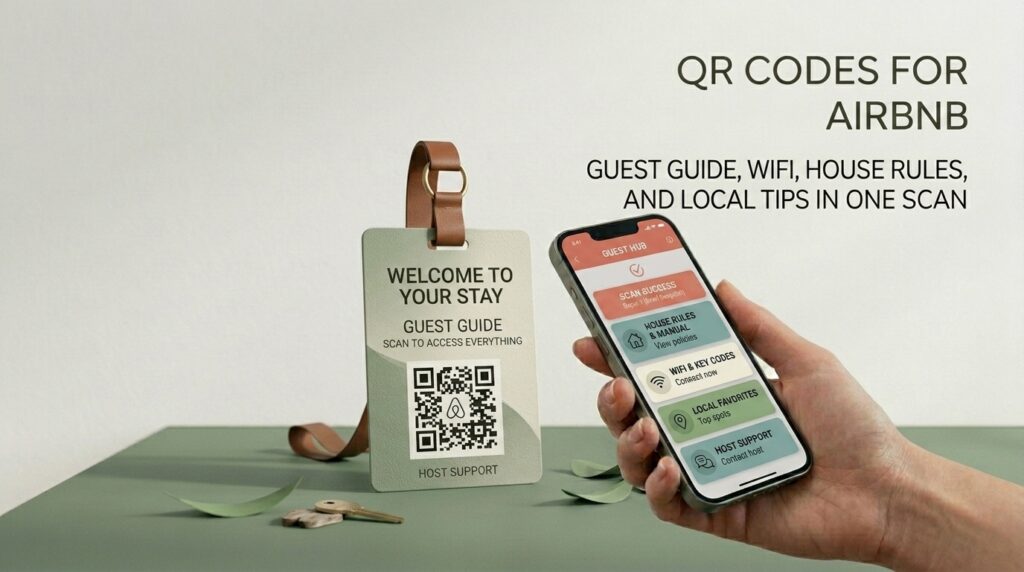
A single QR code card on the kitchen counter solves all of it. One scan and the guest has everything: WiFi, house rules, checkout instructions, local recommendations, and emergency contacts. No folder. No printed sheets. No waiting.
This guide covers which QR codes to create for an Airbnb property, how to set each one up for free, and how to present them so guests actually use them.
The 5 QR Codes Every Airbnb Host Should Have
1. WiFi QR code
The WiFi password is the first thing every guest asks for. A WiFi QR code eliminates the question entirely. The guest scans, their phone connects automatically, and they never need to type a password or wait for a message.
At toolshash.com, select WiFi from the QR Type dropdown. Enter the network name (SSID), the password, and the encryption type (WPA2 for most modern routers). The generator encodes all three fields directly into the code. The guest scans and connects. No password visible, no transcription errors.
Print this code on a small card and place it at eye level near the TV or on the kitchen counter where guests naturally look first. For the full WiFi QR code setup guide, see WiFi QR code generator: share your password without saying a word.
2. Digital welcome guide and house rules
A QR code linking to a digital guest guide replaces the laminated folder that most hosts spend an afternoon producing and guests skim for thirty seconds. A digital guide hosted on a Google Doc, a Notion page, or a dedicated site like Hostfully or Touch Stay can be updated instantly without reprinting anything. Change the checkout time, add a new restaurant recommendation, update the bin collection day. One edit and every future guest sees the current information.
Build the guide on Google Docs or Google Sites. Set sharing to “Anyone with the link can view.” Copy the URL and create a QR code at toolshash.com using Website / URL. Download as SVG for print.
3. Local area guide
A QR code linking to a curated local recommendations page is one of the highest-value things an Airbnb host can offer. Guests who feel like insiders in a neighborhood review better, stay longer on repeat visits, and recommend the property to others.
Build a simple Google Doc with genuine recommendations: the coffee shop you actually use, the best walking route, the restaurant not on every tourist list. Add opening hours, a line about why each place is worth visiting, and a Google Maps link for each one. Share it via QR code and it becomes one of the most memorable parts of the stay.
4. Checkout instructions
A QR code on the back of the welcome card or on the bedroom door linking to a checkout checklist removes the ambiguity that leads to bad reviews. Guests uncertain about stripping the bed, leaving keys, or checkout time sometimes just leave without completing tasks that matter to the host. A scannable checkout checklist displayed the night before departure or on the morning of checkout gives guests clear, actionable instructions at exactly the right moment.
5. Review request
A QR code linking directly to your Airbnb listing’s review page, placed on a small card near the door as guests leave, captures the moment of highest satisfaction. A guest who just had a good stay and scans the code before stepping out is in the ideal state to leave a five-star review. The friction of finding the listing, navigating to the reviews section, and writing something is the barrier most hosts never remove. The QR code removes it entirely.
Your Airbnb listing URL is the direct link to your property on Airbnb. Guests who tap it from a phone are taken directly to the listing where they can leave a review after their stay is complete.
How to Create Every Airbnb QR Code for Free
All five codes are created using the same process at toolshash.com. No account. No signup. Completely free.
- Go to toolshash.com/custom-qr-code-generator.
- Select the QR type. Use WiFi for the WiFi code and Website / URL for every other code in this list.
- Enter the content: WiFi credentials for the WiFi code, or the URL of the guide, local page, checkout list, or listing for each other code.
- Customize the design. A consistent color across all your property’s QR codes creates a cohesive look that feels considered rather than improvised. Choose a color from your property’s decor palette or a neutral dark color that works with the printed card or frame you plan to use.
- Click Generate. Scan the preview on your phone before downloading. Confirm the right destination loads.
- Download as SVG for print. SVG scales to any size without quality loss.
Create your Airbnb QR codes free at toolshash.com
How to Display QR Codes in an Airbnb Property
A QR code that is hard to find or hard to scan does not get used. Placement and presentation matter as much as what the code links to.
Framed card on the kitchen counter or side table
A small printed card in a simple A6 frame is the cleanest display format for an Airbnb welcome QR code. It looks intentional rather than tacked on. Place it where guests naturally gravitate first: the kitchen counter, the side table by the sofa, or the bedside table. A 4cm x 4cm code on an A6 card is large enough to scan comfortably from any angle at typical indoor distances.
Laminated card by the door
The review request code and checkout instructions code work best near the exit. A laminated card hung by the front door or placed on the door handle catches guests at exactly the right moment: leaving. The laminate protects the card from moisture and handling, which matters for a code that will be used by every guest over the property’s lifetime.
Behind the door of the bathroom or bedroom
House rules and checkout instructions placed on the back of a bedroom or bathroom door catch guests during the idle moments of a stay. A guest in the bathroom or lying in bed before sleep is more likely to read through checkout instructions than one rushing out the door in the morning.
QR code welcome book page
If you use a physical welcome book, include QR codes within it rather than replacing it entirely. A QR code at the top of the local recommendations section that links to the full digital version. A QR code in the rules section that links to the complete, current version of your house rules. The physical book serves guests who prefer it. The QR codes serve guests who want the digital version.
Designing QR Codes That Fit Your Property’s Aesthetic
Most Airbnb hosts design their properties carefully. A plain black and white QR code on a printed card breaks that aesthetic. A code designed to match the property’s colors and style does not.
At toolshash.com, use the foreground color picker to match the code to your property’s accent color. A property with sage green textiles looks better with a sage-adjacent dark green code than a generic black one. A coastal property with navy blue cushions looks better with a deep navy code. Choose rounded dot shapes and leaf or rounded eye styles for a warmer, more residential feel. Square dots are cleaner for a more contemporary or minimal property aesthetic.
For properties with a logo or brand identity, embedding that mark in the QR code centre connects the code to the brand. Upload the logo as a transparent PNG at toolshash.com, set error correction to H (High), and keep it under 25% of the code area. See the full guide at how to add a logo to a QR code.
Updating Your Airbnb QR Codes When Things Change
The WiFi QR code contains the password directly. If you change the WiFi password, you need to create a new WiFi code and reprint the card. For a property that rarely changes its WiFi credentials, this is a minor inconvenience. For hosts who change passwords between guests as a security measure, consider printing a single WiFi code card that is replaced with each stay rather than a permanent framed display.
Every other QR code in this list links to a URL you control. If your welcome guide, local recommendations, or checkout instructions live on a Google Doc or Google Sites page, you can update the content without touching the QR code. The code stays the same. The page it links to changes. This is the key advantage of linking to a hosted page rather than encoding the content directly in the code.
For a full explanation of how static QR codes work and why they do not expire, see do QR codes expire?
Frequently Asked Questions
Does the Airbnb WiFi QR code work on all guest phones?
Any smartphone running iOS 11 or later or Android 8 or above scans and connects to WiFi automatically using the native camera app. Most modern smartphones released since 2017 support this. For older devices, a guest can scan the code with a QR scanner app and the WiFi credentials will be displayed so they can enter them manually. The code serves both scenarios.
Can I use the same QR codes in multiple properties?
Only if the destination content is the same for both properties. A single local guide page that covers both properties’ areas would use the same code. A WiFi code is unique to each property because each property has different credentials. For multi-property hosts, create a separate set of codes for each property and label the print files clearly to avoid mixing them up during printing or setup.
Should I use a static or dynamic QR code for Airbnb?
Static for everything except the WiFi code, which is always static by nature. The welcome guide, local recommendations, and checkout codes should all link to pages on Google Docs or Google Sites that you can update without reprinting. The code is static. The content it links to is editable. This gives you the permanence of a static code with the flexibility of editable content. For the full comparison, see static vs dynamic QR codes: which one do you actually need?
What size should the QR code be on a printed card?
For a card scanned from a normal seated or standing distance of 30 to 60cm, a minimum of 3cm x 3cm is comfortable. A 4cm x 4cm code on an A6 card gives generous margins and reliable scanning for guests of any age using any modern phone. According to Denso Wave’s printing guidelines, a QR code scans reliably at up to ten times its own width, so a 4cm code is readable from up to 40cm.
What if a guest cannot scan QR codes?
Always include a short written URL alongside any QR code that links to important information. A guest who cannot scan the WiFi code should be able to type the URL or see the password written on the card. A guest who cannot scan the welcome guide code should find the URL printed below it. QR codes make access easier for most guests. Written fallbacks ensure no guest is excluded.
Can I put my Airbnb QR codes in the listing photos?
You can photograph your property’s QR code card as part of a lifestyle image showing the property’s interior. Guests who spot the framed card in a listing photo know before arrival that WiFi and a guide are waiting. That is a small positive signal in a competitive listing. Ensure the QR code in any listing photo points to content appropriate for anyone who might scan it, including people browsing who have not booked.