You see a QR code on a poster, a parking meter, or a restaurant table. You want to scan it but you pause. You have heard something about QR code scams. You are not sure whether it is safe.
Here is the direct answer: QR codes themselves are completely safe. The code is just a visual pattern that stores data. It cannot do anything harmful on its own. The risk, when it exists, comes entirely from where the code sends you.
This guide explains exactly how QR code scams work, how to spot a suspicious code before you scan it, and the simple habits that eliminate almost all of the risk.
Why QR Codes Are Not Inherently Dangerous
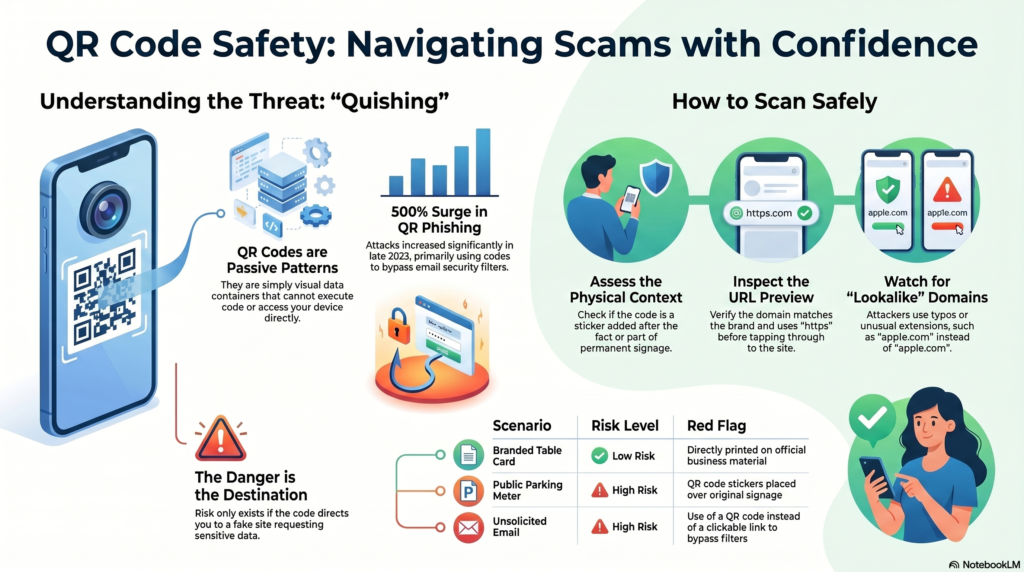
A QR code is a passive data container. It stores information in a pattern of black and white squares. When your phone scans it, the camera decodes the pattern and reads whatever data is stored inside. The code itself cannot execute code, cannot access your device, and cannot install anything.
Think of it like a printed URL in a newspaper. The text itself is harmless. What matters is whether the website it sends you to is trustworthy. A QR code works the same way. The pattern is neutral. The destination determines the risk.
This is confirmed by how the format works at a technical level. The ISO/IEC 18004 QR code standard defines QR codes as a data encoding format. There is no mechanism in the standard for executing code or accessing device functions directly from a scan.
How a Malicious QR Code Actually Works
A bad actor cannot make the QR code itself harmful. What they can do is create a QR code that points to a harmful destination.
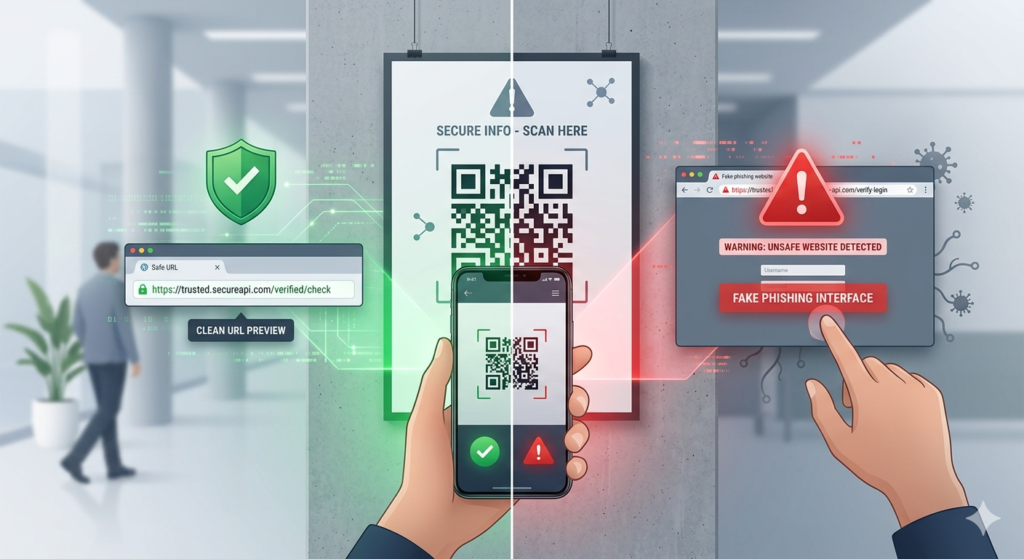
The most common form of QR code abuse is quashing, a portmanteau of QR and phishing. The attacker creates a QR code that links to a fake website designed to look like a legitimate one. The fake site asks the victim to enter login credentials, payment details, or personal information. That data goes to the attacker instead of the legitimate service.
In January 2022, the FBI issued a public warning about malicious QR codes being used in exactly this way. The FBI Internet Crime Complaint Center advisory described cases where attackers placed fraudulent QR code stickers over legitimate ones at parking meters, cryptocurrency kiosks, and in phishing emails. Victims scanned the sticker, landed on a convincing fake payment page, and entered their card details.
A second form of attack uses QR codes in emails or documents to bypass corporate email security filters. Many email security systems scan for malicious links in text but do not analyse QR code images. Attackers embed a QR code image in a phishing email. The link inside the code evades the filter. The victim scans the code with their personal phone, which has fewer security controls than the corporate network.
According to Check Point Research, QR code phishing attacks rose by over 500% in September 2023 compared to the two previous months. The email bypass technique was the primary driver.
How to Tell Whether a QR Code is Safe to Scan
You cannot tell anything about a QR code’s destination just by looking at the code itself. One QR code looks exactly like another regardless of where it points. The assessment has to happen before and after scanning, not from the code’s appearance.
Before scanning: assess the context
The most reliable signal of a safe QR code is its physical and contextual source.
- Is the QR code where it should be? A QR code printed directly onto a restaurant’s branded table card, a business’s official printed material, or a venue’s permanent signage is almost certainly legitimate. A QR code sticker placed over an existing sign, on a parking meter, or on any surface that suggests it was added after the fact is a warning sign.
- Does the placement make sense? A QR code at a legitimate payment terminal in a supervised car park is different from a QR code sticker found on a random street sign. Context is everything.
- Is it on printed material you received directly? A QR code on an invoice or business card from a company you know is lower risk than one from an unsolicited email or anonymous flyer.
After scanning: check the URL before tapping through
This is the most important habit. When you scan a QR code, your phone shows you the URL it is about to open before you tap through to it. Take one second to read it.
- Does the domain name match the organization it claims to represent? A QR code at a Nationwide bank counter should link to
nationwide.co.uk, notnationwide-secure-login.com. - Does the URL start with
https://? An unencryptedhttp://connection is a warning sign for any page asking for sensitive information. - Does the domain look strange? Attackers use lookalike domains with small typos, added words, or unusual top-level domains to impersonate legitimate sites.
app1e.comis not the same asapple.com.
If anything about the URL looks wrong, do not tap through. Close the notification and verify the organization’s actual URL through a search or by typing it directly.
The Specific Situations That Carry More Risk
Most QR code scanning is completely safe. A few contexts carry higher risk and are worth knowing about.
QR codes in unsolicited emails
If you receive an email from an organization you did not expect, and it contains a QR code rather than a clickable link, treat it with caution. The email bypass attack described above specifically uses QR codes to avoid detection. Legitimate organizations generally do not require you to scan a QR code from an email to log into your account or make a payment.
QR code stickers in public spaces
Legitimate businesses print QR codes directly onto their materials. They rarely use removable stickers placed over existing signs. If a QR code looks like it was added on top of something else, or if the sticker does not align cleanly with the surrounding design, do not scan it. This was the specific attack method described in the FBI advisory.
QR codes at payment points
Any QR code that leads to a payment page requires extra scrutiny. Verify the domain carefully. For parking or any regulated service, look up the official website independently and use that rather than the QR code if you have any doubt.
QR Codes You Create Are Safe
The safety question cuts both ways. If you are a business owner creating QR codes for your customers, the codes you generate point to whatever URL you enter. There is nothing harmful in the code itself. A QR code you create at toolshash.com pointing to your menu, your WiFi network, your Google review page, or your Instagram profile is completely safe for customers to scan.
The only way a QR code you create could cause a problem is if it points to a URL that changes to something harmful after you have already printed it. This is an argument for pointing your QR codes to stable URLs that you own and control, rather than third-party links that could be modified or redirected without your knowledge.
Reassuring Your Customers
Some customers, particularly older ones, may be hesitant to scan a QR code they see in your business. A few things help:
- Print the destination URL in small text beneath the QR code. A customer who can see that the code links to
yourbusiness.com/menuhas visual confirmation before they scan. - Use a branded QR code with your logo in the center. A QR code that visibly carries your brand is harder to mistake for something placed by a third party.
- Add a short prompt: “Scan to view our menu” or “This code links to our Google review page.” Context removes ambiguity.
Frequently Asked Questions
Can a QR code install malware on my phone just from scanning it?
No. Scanning a QR code decodes the data stored in the pattern. It does not execute any code on your device. A QR code cannot install anything, access your contacts, or trigger any device function by itself. The risk arises only if the code sends you to a malicious website and you interact with it by entering information, downloading a file, or tapping a misleading prompt. Scanning alone is harmless.
Can a QR code steal my personal information?
Not directly. A QR code is a passive pattern. However, if it sends you to a phishing site and you enter your credentials or payment details there, that information goes directly to the attacker. The theft happens on the website, not in the scan. This is why checking the URL before tapping through is the single most protective habit.
Is it safer to use a QR scanner app instead of my camera?
Some QR scanner apps offer URL preview and safety checking features that can flag suspicious links before they open. The native iOS camera and Android Google Lens both show you the URL before opening it, which provides the core protection. A dedicated security-focused scanner app adds an extra layer but is not necessary for most everyday QR code scanning.
Are QR codes in emails ever legitimate?
Yes, some legitimate organizations use QR codes in emails. Marketing emails sometimes include QR codes for in-store offers. Event confirmation emails include QR codes for entry. The test is the same: check the URL the code is pointing to before tapping through. If the domain matches the sender’s known website and the context makes sense, it is most likely legitimate.
What should I do if I think I scanned a malicious QR code?
If you scanned a code and landed on a suspicious page but did not enter any information, close the browser tab immediately. No harm should have occurred from the scan alone. If you entered login credentials on a suspicious page, change that password immediately on the legitimate service. If you entered payment card details, contact your bank right away to report the potential fraud and request a replacement card. The FBI Internet Crime Complaint Center accepts reports of QR code phishing incidents at ic3.gov.
How do I know if a QR code in my business is still pointing to the right place?
Scan it. That is the only reliable test. Scan the printed code on your materials, not the digital preview, and confirm the destination loads correctly. Do this periodically, particularly after any changes to your website, menu platform, or any URL your QR codes point to. A few seconds of testing prevents customers from landing on a broken page or an outdated destination.