You printed 300 menus with a QR code six months ago. Or you put a QR code on a sign that has been in your shop window for a year. And now you are wondering: does this thing still work? Is there an expiry date you missed?
The answer depends entirely on what type of QR code it is and where you created it. Some QR codes last forever. Others stop working the moment a subscription lapses or a platform changes its policies.
This guide explains which type of QR code expires, which one lasts forever, what causes codes to stop working, and how to make sure yours keeps scanning long-term.
The Short Answer
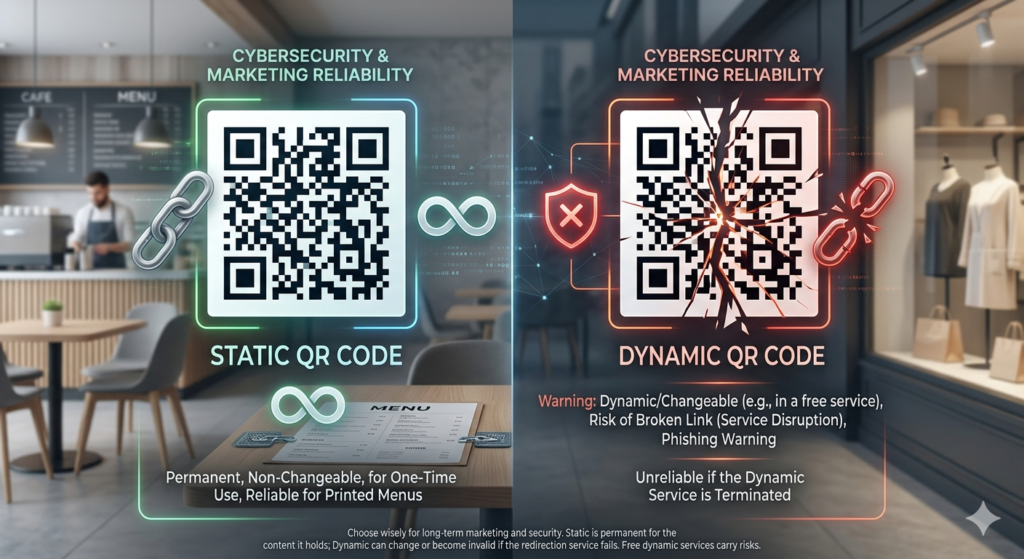
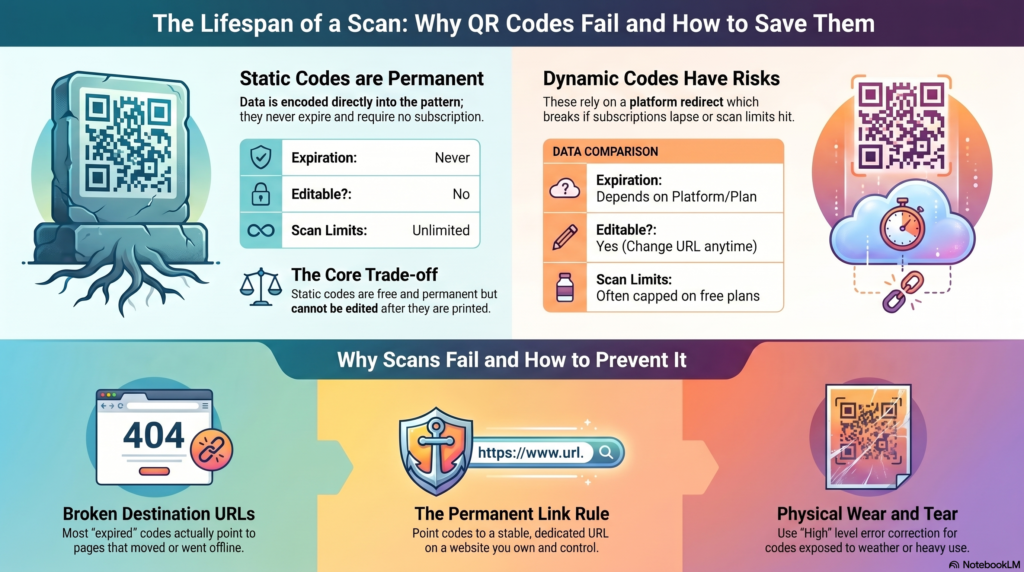
Static QR codes never expire. They have no built-in time limit, no scan limit, and no dependency on any platform staying active. A static QR code created today will still work in ten years as long as the destination it points to still exists.
Dynamic QR codes can expire, depending on the platform that created them and the plan you are on. Free plans on many QR code platforms limit the number of scans, the number of active codes, or impose a time limit. When you hit that limit, the QR code stops working.
Everything comes down to whether the code is static or dynamic. Understanding that distinction is the only thing you need to know to never have a dead QR code again.
Static QR Codes: Why They Never Expire
A static QR code stores the destination information directly inside the code itself. The URL, WiFi password, contact card, or text is encoded in the pattern of black and white squares. When someone scans it, their phone decodes the pattern and reads the data. There is no external server involved. There is no platform that needs to be active. There is no subscription that can lapse.
The code is entirely self-contained. Once it is created and saved, it functions independently of the tool that generated it. You could delete your account on the generator you used, close the browser, and switch off the computer. The QR code would keep working.
This is confirmed by the ISO/IEC 18004 international QR code standard, which defines the QR code format as a self-contained data storage system. There is no concept of expiry built into the standard itself.
Static QR codes created at toolshash.com are static by default. They have no expiry date and no scan limit. You can create as many as you need, download them, and they will work indefinitely.
Dynamic QR Codes: When and Why They Expire
A dynamic QR code works differently. Instead of storing the destination URL directly in the code, it stores a short redirect URL hosted by the QR code platform. When someone scans the code, their phone follows the redirect, and the platform sends them to the final destination.
This redirect is where expiry happens. If the platform deactivates the redirect, the QR code stops working. Common reasons this happens include:
- Free plan scan limits: many platforms cap the number of scans allowed on a free plan. Once you hit the limit, the redirect stops forwarding and the code shows an error page instead of your destination.
- Free plan code limits: some platforms limit the number of active codes on a free plan. When you create a new code, an older one gets deactivated.
- Subscription lapse: if you created a dynamic code on a paid plan and stop paying, the platform typically deactivates all codes on your account. Printed materials carrying those codes stop working the day the subscription ends.
- Platform shutdown: if the QR code platform closes down entirely, all dynamic codes it hosted stop working. This has happened with several free QR code services over the years.
- Account inactivity: some platforms deactivate accounts and their associated codes after a period of inactivity.
The risk with dynamic codes is real. The QR code printed on your menu, your packaging, or your shop sign is only as reliable as the platform that hosts the redirect. For anything printed at scale, this dependency is worth taking seriously before committing.
What Actually Makes a QR Code Stop Working?
Most QR code failures are not caused by the code itself expiring. They are caused by one of these three things.
The destination URL went offline
A static QR code pointing to a web page that no longer exists shows a 404 error when scanned. The code itself is working perfectly. The problem is the destination. This is the most common cause of QR code failures in the real world.
Common versions of this problem: a restaurant changes their online menu platform and the old URL stops working. A business redesigns their website and the page the QR code pointed to moves to a different URL. A Google Drive or Dropbox link expires because the sharing settings were changed.
The fix is to point QR codes at stable, permanent URLs wherever possible. A dedicated page on your own website at a fixed URL is far more reliable than a third-party hosted document that might move or expire.
The platform deactivated the code
As covered above, this applies to dynamic codes on platforms that impose scan limits or subscription requirements. The code scans but the redirect points nowhere, or the platform serves an error page instead of forwarding to your destination.
The physical code is damaged or too degraded to scan
A QR code printed on low-quality material, exposed to weather, or physically damaged can become unreadable. The ISO/IEC 18004 standard includes error correction that allows a QR code to scan even with up to 30% of it damaged, but beyond that threshold the code fails. For outdoor or high-wear applications, print on durable materials and use High (H) level error correction.
Does Canva’s QR Code Expire?
This is one of the most searched questions in this category and the answer is: it depends on how you used it.
Canva generates QR codes as part of its design tools. Canva’s free QR codes are static, meaning they store the URL directly in the code and do not expire on their own. However, Canva Pro introduced dynamic QR code features that do go through Canva’s servers. If your Canva Pro subscription lapses, dynamic QR codes created with Canva Pro features may stop working.
If you created a basic URL QR code in Canva’s free tool and downloaded it as an image, it is static and will not expire. If you used Canva Pro’s dynamic QR features, the code’s longevity depends on your ongoing subscription status.
When in doubt, test the code. Scan it and confirm it still opens the right destination. If it does, it is working. If it shows an error, the redirect has been deactivated or the destination URL has changed.
How to Make Sure Your QR Code Lasts Forever
Three rules cover almost every scenario.
Rule 1: Use a static QR code for anything printed at scale
For menus, packaging, business cards, signage, and any printed material you will not be replacing regularly, use a static QR code. Create it at toolshash.com, download the SVG, and send it to print. It will work as long as the destination URL stays live.
Rule 2: Point the code at a URL you control permanently
A dedicated page on your own website at a fixed URL is the most reliable destination for a long-term QR code. Avoid linking to temporary shared documents, third-party hosted pages that might change, or URLs that include query strings or session tokens that can expire. A clean URL you own and control is the most durable option.
Rule 3: Test before printing and periodically after
Scan the code before printing. Scan it again when materials arrive from the print shop. Then make a habit of scanning it once every few months to confirm the destination still loads correctly. A dead QR code that nobody noticed for six months is a problem that was easy to prevent.
Static vs Dynamic: The Full Comparison
For anyone still deciding which type to use, the core trade-off is straightforward. Static codes are permanent and free but cannot be edited after creation. Dynamic codes can be edited and tracked but carry the risk of expiry and platform dependency.
For a full breakdown of both types with use-case recommendations, see static vs dynamic QR codes: which one do you actually need?
Frequently Asked Questions
How long does a QR code last?
A static QR code lasts indefinitely. There is no built-in expiry date in the QR code format itself, as confirmed by the ISO/IEC 18004 standard. The code keeps working for as long as the destination URL is live. A dynamic QR code lasts as long as the platform hosting the redirect stays active and your plan remains in good standing.
Do QR codes expire after a certain number of scans?
Static QR codes have no scan limit. They can be scanned thousands of times and keep working. Dynamic QR codes on free plans often have a monthly or total scan cap. Once the cap is reached, the redirect stops forwarding. Check the terms of any platform you use for dynamic codes before printing at scale.
Can I check if a QR code is still working without printing it?
Yes. Scan it on your phone directly from the screen where the code is displayed. If it opens the correct destination, it is working. If it shows an error page, the destination URL has moved or the redirect has been deactivated. Always test both the digital preview and the printed version before distributing materials.
What happens when a QR code stops working?
The person scanning sees whatever the destination shows. If the URL no longer exists, they see a 404 error page. If a dynamic redirect was deactivated, they might see the platform’s error page or be redirected to the platform’s homepage. Either way, they do not reach your intended content. There is no visual indication on the QR code itself that it has stopped working. The code looks identical whether it works or not.
If I delete my toolshash.com history, does my QR code stop working?
No. QR codes created at toolshash.com are static. Once downloaded, the code works independently of the toolshash.com website. Clearing your browser history, closing the tab, or even if toolshash.com were to change its service would have no effect on a QR code you already downloaded. The data is encoded in the image file you saved.
Should I use a dynamic QR code if I want to update the destination later?
Only if the trade-off is worth it for your use case. Dynamic codes give you the ability to change the destination without reprinting, which is valuable for restaurant menus, seasonal campaigns, and any content that changes regularly. But they come with platform dependency and expiry risk. If your destination URL is stable and unlikely to change, a static code is simpler and more reliable. For the full comparison, see static vs dynamic QR codes: which one do you actually need?