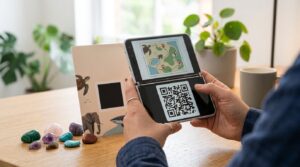
Fahlo sells bracelets and accessories where each one comes with a QR code that connects you to a real wild animal being tracked by conservation researchers. Scan the code on your bracelet and you can follow that specific animal’s actual GPS movements on a map, see where it travels, and learn about its habitat and behavior. It is one of the more thoughtful uses of QR codes in consumer products, and the search volume around specific animal variants shows just how engaged the community is.
Here is how Fahlo QR codes work, what each animal bracelet connects you to, how to scan your code, and what to do when it does not work as expected.
How Fahlo QR Codes Work
Each Fahlo bracelet includes a QR code printed on the packaging or on a card that ships with the product. Scanning the code opens the Fahlo app or website and links your account to a specific tracked animal. From that point, you can follow the animal’s movements in real time through satellite or GPS tracking data provided by Fahlo’s conservation research partners.
The QR code is unique to each product batch and connects to a specific animal or a pool of animals of that species. When you scan, Fahlo assigns you to a specific individual within that species group. The tracking data updates as the research partners upload new location points, which happens on varying schedules depending on the species and tracking method.
You need the Fahlo app installed on your phone to get the full tracking experience. Scanning the QR code without the app installed typically opens a web page prompting you to download it.
Fahlo Snow Leopard QR Code
The snow leopard bracelet is the most searched Fahlo product by a wide margin, with 1,900 monthly searches for the QR code specifically. Snow leopards are tracked through camera trap data and GPS collars in partnership with conservation organizations working in Central Asia. When you scan your snow leopard bracelet QR code, Fahlo connects you to a real tracked individual and shows its range across mountainous terrain.
Snow leopards have large home ranges and move infrequently compared to some other tracked species, so location updates may be less frequent than for more active animals. The Fahlo app shows the most recent tracking data available from the research team.
Fahlo Whale Shark QR Code
Whale shark bracelets connect to tracking data from whale sharks tagged by marine conservation researchers. Whale sharks are the largest fish in the ocean and migrate across enormous distances. Tracking updates show movement through open ocean routes, often spanning multiple ocean basins over time.
The whale shark and whale shark variants collectively account for significant search volume across the Fahlo QR cluster, reflecting strong interest in marine species among Fahlo buyers.
Fahlo Cheetah QR Code
Cheetah bracelets connect to GPS-collared cheetahs tracked by conservation organizations across Africa. Cheetahs are among the more active tracked species in the Fahlo lineup, with location updates that show daily movement patterns across their territory. This makes the cheetah bracelet one of the more engaging tracking experiences since the animal moves frequently enough to provide regular updates.
Fahlo Manatee QR Code
Manatee bracelets track West Indian manatees through partnerships with Florida-based marine research organizations. Manatees are slower-moving and tend to stay within more predictable coastal and river habitats compared to ocean species, which means location updates paint a clear picture of seasonal movement between warm-water refuges and feeding areas.
Other Fahlo Animal QR Codes
Fahlo offers bracelets for multiple species beyond the most-searched ones. Current and past offerings include:
- Polar bear bracelets tracking bears in Arctic research programs
- Elephant bracelets connected to African elephant tracking data
- Wolf bracelets linked to GPS-collared wolf packs in conservation monitoring programs
- Koala bracelets tracking koalas through Australian wildlife research
- Dolphin bracelets connected to marine mammal research tracking
- Penguin bracelets linked to seabird research programs in the Southern Ocean
The specific animals available change as Fahlo adds new conservation partnerships. Check the Fahlo website for current bracelet offerings and the species available.
How to Scan Your Fahlo QR Code
- Download the Fahlo app from the App Store or Google Play if you have not already
- Create a Fahlo account or log into your existing one
- Open the Fahlo app and look for the Scan QR Code or Add Animal option in the menu
- Point your phone camera at the QR code on your bracelet packaging or included card
- The app links your account to your assigned animal and opens the tracking map
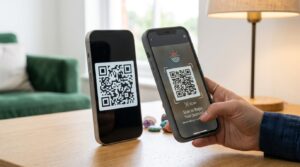
You can also scan the QR code with your phone’s standard camera app. This typically opens a link to the Fahlo website or prompts you to open the Fahlo app. If you already have the app installed, it handles the link automatically and adds the animal to your account.
Fahlo QR Code Not Working: Common Fixes
Several issues can prevent a Fahlo QR code from linking correctly.
App not installed or not updated: The QR code scan process routes through the Fahlo app. If the app is not installed, scanning opens a web page rather than adding the animal. If the app is outdated, the link may not process correctly. Install or update the app before scanning.
QR code already redeemed: Fahlo QR codes are typically one-use per account. If the code was already scanned and added to an account, scanning it again on a different account may not work. If you bought a secondhand bracelet that was already redeemed, contact Fahlo support with proof of purchase.
Poor image quality: If the QR code card or packaging is creased, wet, or damaged, the camera may struggle to read it. Try scanning in good lighting and hold the camera steady at the distance where the entire code fits clearly in the frame.
Account not logged in: Make sure you are logged into your Fahlo account in the app before scanning. Scanning while logged out may not correctly associate the animal with your profile.
Free Fahlo QR Codes: What to Know
Searches for “free Fahlo QR codes” for snow leopard, manatee, wolf, koala, and other species reflect people looking for codes to try the tracking experience without buying a bracelet. Fahlo’s QR codes are tied to physical product purchases and are not distributed separately as standalone free codes. The company occasionally runs promotions, giveaways, and partnerships through its social channels where codes or bracelets are offered as prizes.
Codes shared by individuals online who received them as gifts but already have the animal tracked on another account may work if unused, but this is not a guaranteed or officially supported method. For the full experience including the physical bracelet and card, purchasing directly from Fahlo is the reliable route.
The Broader Picture: QR Codes for Conservation
Fahlo is a good example of how QR codes bridge physical products with digital experiences in a way that creates ongoing engagement. The bracelet is the physical reminder; the QR code is the activation key; and the app provides the continuing experience of watching a real animal move through the world. That three-part structure shows up across consumer products, packaging, and educational materials wherever a physical object needs to connect someone to a digital experience over time.
For businesses that want to create a similar physical-to-digital bridge using QR codes on products, packaging, or merchandise, the QR code generator creates print-ready codes in any design style with SVG download for production-quality output. And for detailed guidance on getting QR codes right on physical packaging specifically, the QR code for product packaging guide covers sizing, file formats, and print specifications in detail.
Frequently Asked Questions
How do I scan my Fahlo QR code
Download the Fahlo app, log into your account, and use the app’s scan feature or your phone’s camera to scan the QR code on your bracelet packaging. The app links your account to your assigned animal and opens the tracking map showing real GPS data from research partners.
What does the Fahlo snow leopard QR code connect to
The snow leopard bracelet QR code connects you to a real tracked snow leopard monitored by conservation researchers in Central Asia. Scanning it in the Fahlo app assigns you to a specific tracked individual and lets you follow its movements on a map using actual GPS and camera trap data from the field.
Why is my Fahlo QR code not working
The most common causes are the Fahlo app not being installed or updated, the code having already been redeemed on another account, poor image quality on a damaged or creased card, or not being logged in to your account when scanning. Install or update the app, make sure you are logged in, and try again in good lighting with the full code visible in the camera frame.
Are there free Fahlo QR codes
Fahlo QR codes come with purchased bracelets and are not distributed separately as free standalone codes. Fahlo occasionally offers giveaways and promotions through its social channels where bracelets or codes are given as prizes. Unused codes shared by others may work but are not an officially supported method.
Which animals does Fahlo track with QR codes
Fahlo offers bracelets for snow leopards, whale sharks, cheetahs, manatees, polar bears, elephants, wolves, koalas, dolphins, penguins, and additional species added through new conservation partnerships. Each bracelet connects to a real tracked individual of that species through GPS or satellite data provided by Fahlo’s research partners.
Can I scan a Fahlo QR code without the app
Scanning with your standard camera app opens a link to the Fahlo website. For the full tracking experience and to add the animal to your account, you need the Fahlo app installed. The website scan may prompt you to download the app before completing the animal assignment.
Your Animal Is Out There Right Now
Somewhere a snow leopard is crossing a ridge. A whale shark is moving through open water. A cheetah is covering ground across the savanna. The Fahlo QR code on your bracelet connects your physical purchase to that real movement in the world. Scan it, open the map, and watch where your animal goes.
For creating QR codes for your own products that connect customers to digital experiences, the QR code generator handles any URL with full design customization and print-ready output. And for guidance on product packaging QR codes specifically, the QR code for product packaging guide covers everything you need.