You used Canva to add a QR code to a flyer or a business card design. Now it is printed and out in the world. And you are wondering whether it will still work in six months, or whether Canva is going to deactivate it when your free trial ends or your subscription lapses.
This is one of the most searched questions in the QR code space and the answer is more nuanced than most articles admit. It depends on which Canva plan you used and which type of QR code Canva generated.
This guide gives you the direct answer. Why the distinction matters before you print anything else. And how to create a QR code with zero expiry risk at no cost.
The Short Answer
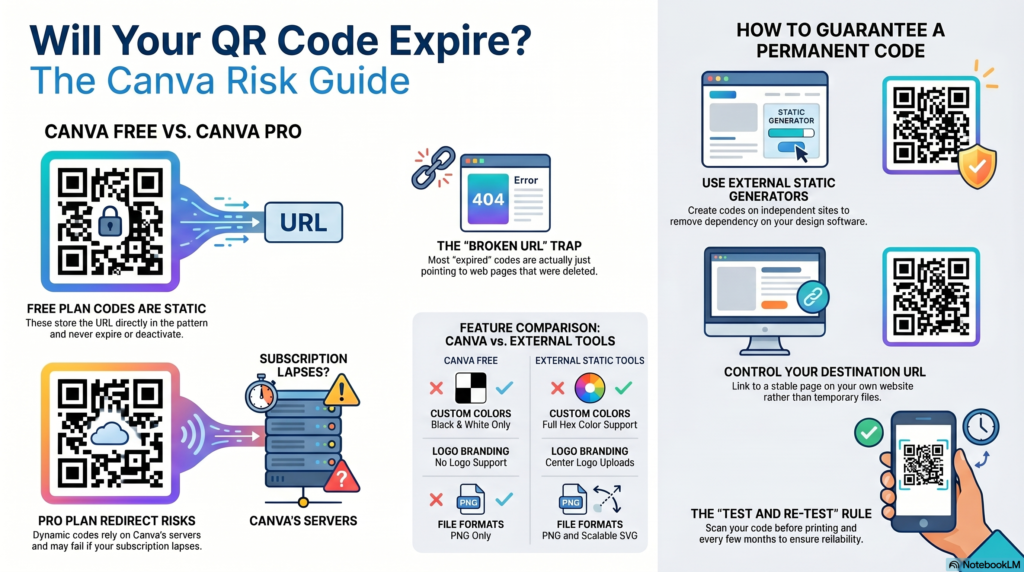
Canva’s free QR code generator creates static QR codes that do not expire. A static QR code stores the URL directly inside the code pattern itself. It has no connection to Canva’s servers after you download the image. You could cancel your Canva account, and the code on your printed materials would keep working indefinitely.
Canva Pro’s dynamic QR code features are a different story. Dynamic codes use a redirect hosted on Canva’s platform. If your Canva Pro subscription lapses, those redirects may stop forwarding, and the code stops working. The printed QR code becomes dead without any warning to you or the people who scan it.
If you are not sure which type you used, the safest assumption is to test it. Scan the code and confirm it still opens the right destination. If it does, it is working. If not, the redirect has been deactivated or the destination URL has changed.
The Difference Between Canva Free and Canva Pro QR Codes
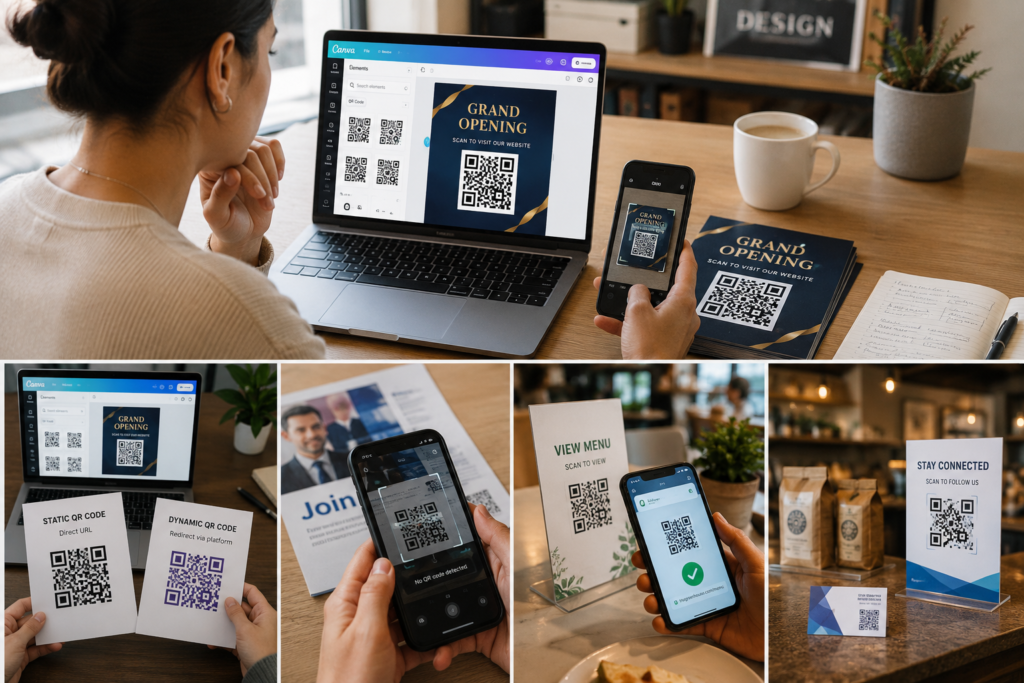
Canva offers QR code generation as part of its design tool. The feature appears in the elements panel and lets you embed a QR code directly into any Canva design. But the behavior of the generated code depends on your account type.
Canva free plan
The free plan generates a basic URL QR code. You enter a web address, Canva creates the code, and you download it as part of your design. This code is static. The URL is encoded directly into the pattern of the QR code image.
Static codes work independently of any platform. Once you download the image, it functions entirely on its own. Canva’s servers are not involved in any scan. There is no redirect. There is no expiry mechanism. The code keeps working as long as the URL it points to stays live.
The limitation of Canva’s free QR code is design flexibility. You get a plain black and white code with no color customization, no logo embedding, and no dot or eye style options. The code works but it looks generic.
Canva Pro plan
Canva Pro added dynamic QR code functionality. A dynamic code uses a short redirect URL hosted on Canva’s platform. When someone scans it, the request goes through Canva’s redirect service before reaching your final destination.
This means the code’s functionality depends on Canva’s redirect service staying active for your account. If your Canva Pro subscription ends, the status of dynamic codes associated with your account is not guaranteed. Canva’s terms of service and feature documentation are subject to change, and relying on a subscription-dependent redirect for materials printed at scale carries real risk.
The advantage of dynamic codes is editability. You can change the destination URL without reprinting. But for most small business uses, that advantage does not outweigh the dependency risk, particularly when free static alternatives exist that last forever.
What Canva Does Not Tell You
Canva’s QR code feature is presented as a design element rather than a standalone QR code tool. The focus is on making the code look good within a design, not on the technical behaviour of the code after download.
The distinction between static and dynamic behaviour is not prominently explained in Canva’s UI. Many users create a QR code, add it to a design, download it, and print it without knowing whether their code has any platform dependency. They find out when the code stops working months later.
The practical risk is low if you used the free plan and created a URL QR code, because that is static. But if you are on Pro and used any dynamic features, your printed materials are dependent on a subscription you may eventually cancel.
The Actual Risk for Most Canva Users
Most people who search “does Canva QR code expire” used the free plan and created a basic URL QR code for a flyer, a poster, or a business card. In that case, the code is almost certainly static and will not expire.
The most common reason a Canva QR code stops working is not expiry. It is a broken destination URL. If the web page the code points to has moved, been deleted, or changed its URL, the QR code shows an error. The code is working. The destination is not.
Before assuming your code has expired, scan it and check the URL your phone shows before opening it. If the URL looks right but the page does not load, the destination has changed. If the URL looks wrong or shows a Canva error page, there may be a platform dependency issue.
A Better Alternative: No Expiry, No Subscription, No Watermark
The safest QR code is one that never expires, never depends on a subscription, and carries no branding from the tool that created it. That is a static QR code created at toolshash.com.
Here is how it compares to Canva for QR code creation specifically:
| Feature | Canva free | toolshash.com |
|---|---|---|
| QR code type | Static (URL only) | Static (14 types including URL, WiFi, vCard, Instagram, WhatsApp, and more) |
| Expiry | Never (static) | Never (static) |
| Scan limit | Unlimited | Unlimited |
| Custom colors | No | Yes, full color picker with hex code input |
| Logo in centre | No | Yes, PNG, JPG, or SVG upload |
| Dot shape options | No | Yes, square, dots, rounded |
| Eye style options | No | Yes, square, rounded, leaf, diamond |
| Gradient option | No | Yes, linear and radial |
| Download formats | PNG (within Canva design export) | PNG and SVG (standalone files) |
| SVG for print | Not directly | Yes, standalone SVG download |
| Account required | Yes | No |
| Cost | Free (within free plan) | Free, no plan needed |
For anyone who needs a QR code specifically, not a full design tool, toolshash.com is a more capable option for the QR code itself. Canva remains the better choice if you need to place a QR code within a full design layout alongside other elements.
The most practical approach for most businesses: create the QR code at toolshash.com, download the SVG, and import that SVG into Canva as an element in your design. You get toolshash’s full design customization on the code and Canva’s layout tools for the rest of the design.
How to Make Sure Any QR Code Lasts Forever
Regardless of which tool you use to create a QR code, the same three rules apply.
Use a static code for anything printed at scale. A static QR code has no expiry date, no scan limit, and no platform dependency. Once downloaded, it works independently of the tool that created it. For menus, business cards, packaging, signage, and any material you will not be reprinting regularly, static is the right choice.
Point the code at a URL you control permanently. A dedicated page on your own website at a stable URL is the most durable destination. Avoid linking to third-party hosted documents, temporary shared links, or URLs with session tokens or query strings that can expire.
Test before printing and periodically afterwards. Scan the code before the print run. Scan it again when materials arrive. Then scan it every few months to confirm the destination still loads. The QR code in your shop window that nobody has tested in a year may have been pointing to a dead page for months. For a full guide on what causes QR codes to stop working, see do QR codes expire?
Frequently Asked Questions
Does cancelling Canva delete my QR codes?
For static QR codes created with Canva’s free tool, cancelling your account has no effect on QR codes you already downloaded. The image file on your computer or in your printed materials is entirely self-contained. For dynamic QR codes created with Canva Pro features, cancelling your subscription may affect the redirect service. Check Canva’s current terms before relying on dynamic codes for long-term printed materials.
Can I move a Canva QR code to another design?
Yes. A QR code in a Canva design is an image element. You can copy and paste it into another Canva design, download it as part of a design export, or use the exported image in any other application. For the most flexible workflow, create your QR code at toolshash.com as a standalone SVG file and import it into Canva as a custom element. This keeps the QR code independent of any Canva plan.
Is there a free QR code generator that never expires and has no scan limit?
Yes. toolshash.com creates static QR codes that never expire, have no scan limit, require no account, and produce no watermark. The codes are fully customizable with colors, logos, dot shapes, and eye styles. Download in PNG or SVG format with no restrictions. No subscription, no free trial that converts, and no platform dependency once the file is downloaded.
What is the difference between a Canva QR code and a QR code made at toolshash.com?
Both create static QR codes that do not expire. The main differences are design flexibility and workflow. Canva’s QR code is a basic black and white code embedded within a Canva design. toolshash.com creates a fully customisable standalone QR code file that can be imported into Canva or any other design tool. For the QR code itself, toolshash offers more control. For placing the code within a larger design, Canva’s layout tools are useful alongside it.
I already printed Canva QR codes. Should I be worried?
If you used Canva’s free plan and created a basic URL QR code, your codes are almost certainly static and will not expire. Test them by scanning and confirming the destination loads correctly. If they work today, they will keep working as long as the destination URL stays live. If you used Canva Pro dynamic features, test the codes and check Canva’s current policy on what happens to dynamic codes when a Pro subscription ends.
Does Canva Pro QR code definitely expire when I cancel?
Canva’s policies are subject to change and the exact behaviour of dynamic codes after subscription cancellation is not always documented clearly. The safest position: do not use dynamic QR codes for materials that will outlast your current subscription. For permanent printed materials, static codes created at toolshash.com or any other static generator remove the dependency entirely. For a full explanation of the static versus dynamic distinction, see static vs dynamic QR codes: which one do you actually need?